
By Assaf Morag, Cybersecurity Researcher
Most phishing kits steal passwords. Kali365 does something more dangerous: it tricks victims into authenticating on a genuine Microsoft page, completing MFA themselves, and unknowingly handing an attacker-controlled session the resulting access tokens. No credentials are intercepted. No fake login page is required. The victim does everything right and still loses control of their identity. But Kali365 is no longer limited to Microsoft 365. What began as a device-code phishing kit has grown into a subscription phishing platform that impersonates identity providers, cloud services, email platforms, file-sharing tools, and messaging applications across multiple brands and regions. In May 2026, the FBI described Kali365 as an emerging Phishing-as-a-Service (PhaaS) platform distributed mainly through Telegram. Its subscription model packages ready-made lures, automated templates, victim tracking, and token-capture tools, lowering the barrier to sophisticated identity attacks.
Key Findings About Kali365
- Kali365 is a subscription phishing platform, not a single email template or one fixed attack flow.
- Its best-documented Microsoft technique abuses OAuth device-code flow to obtain access and refresh tokens without stealing the victim’s password directly.
- The operation has expanded well beyond Microsoft 365, as we have observed operator communications in the underground advertising Google Workspace/G Suite capabilities.
- Other targeted entities and services that were recently observed are: Okta, AWS-themed services, Xerox DocuShare, LiveDrive, GMX, Mail.ru, Yandex Disk, Odnoklassniki, and MAX Messenger.
Credential & Identity Monitoring
Detect PhaaS Campaigns Targeting Your Organization Before They Reach Employees
Phishing-as-a-Service platforms like Kali365 are promoted, sold, and discussed across Telegram and dark web forums before campaigns launch. Flare continuously monitors these underground communities to detect when your brand is being impersonated, when stolen session tokens tied to your organization appear for sale, and when PhaaS operators shift their targeting, giving your team lead time to act.
What is Kali365?
Kali365 is a phishing-as-a-service (PhaaS) platform whose developers maintain infrastructure and provide tools to criminal subscribers. Affiliates can launch campaigns without building phishing pages, authentication tooling, hosting, or management panels themselves. This service model helps attackers scale campaigns and quickly adapt lures to different brands and regions.
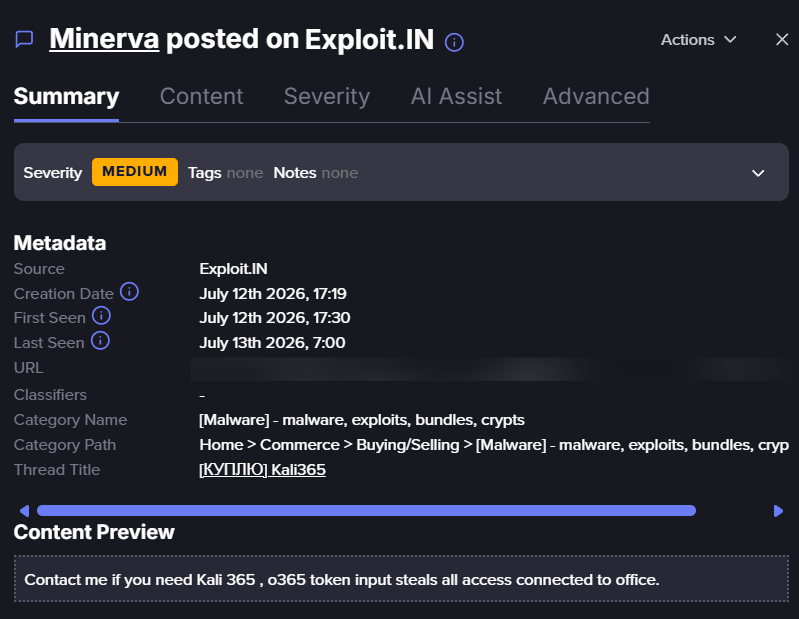
Threat actor offering Kali365 (Flare link to post, sign up for the free trial to access if you aren’t already a customer)
A Broader, Multi-Brand Operation
Public reporting and our observations suggest that Kali365 has expanded from its original Microsoft-focused activity into a broader, multi-brand phishing operation.
The observed pages impersonated services with different business functions:
- Single Sign On (SSO): SSOs (such as Okta) are organizational authentication gateway thus are considered as prime and high-quality targets.
- Document Sharing and Cloud Storage: Services such as Xerox, DocuShare, LiveDrive, and Yandex Disk, are also considered as an organizational high-quality target. They allow further fraud or scams against the targeted organization and can also be sold separately in secondary markets.
- Email Services Providers: SaaS email providers such as GMX and Mail.ru are also highly targeted as they allow access to email boxes of their victims.
In addition, there’s also evidence that Kali365 has impersonated the Russian social network Odnoklassniki. Furthermore, there’s also evidence they used AWS-related domain names. The AWS-themed naming, however, did not reveal which AWS services were targeted.
These findings show that Kali365-related infrastructure can adapt its lures to different brands and audiences, but they do not prove that the same attack method was used against every service. The Microsoft campaigns are associated with OAuth device-code phishing, while the separately documented MAX Messenger campaign followed a different workflow: victims were directed to a fake prize-claim page and asked to submit their phone number, a genuine one-time login code, and, when enabled, their 2FA password.
How the Microsoft 365 Attack Works
The central Microsoft technique abuses OAuth 2.0 device authorization flow, a legitimate method for devices and applications that cannot easily display a full browser or accept credentials. If successful, captured tokens may provide access to resources such as Outlook, OneDrive, SharePoint, or Teams. Exact access depends on token permissions, user privileges, and organizational policies.
In a nutshell this is an embodiment of the cat-and-mouse chase between cybercriminals and technology advancements. Technology evolves users now have their mobile phone, home computer, work computer, tablet, television and other devices. To ease the identity process, technology evolved to enable active sessions which are sometimes authenticated by a user on another device.
The device authorization flow is susceptible to abuse because it separates the device requesting access from the user approving it. Victims authenticate on a legitimate Microsoft login page and may successfully complete MFA, but the authorization is granted to an attacker-controlled session rather than a trusted device. Because no spoofed login page is required, traditional phishing indicators are largely absent.
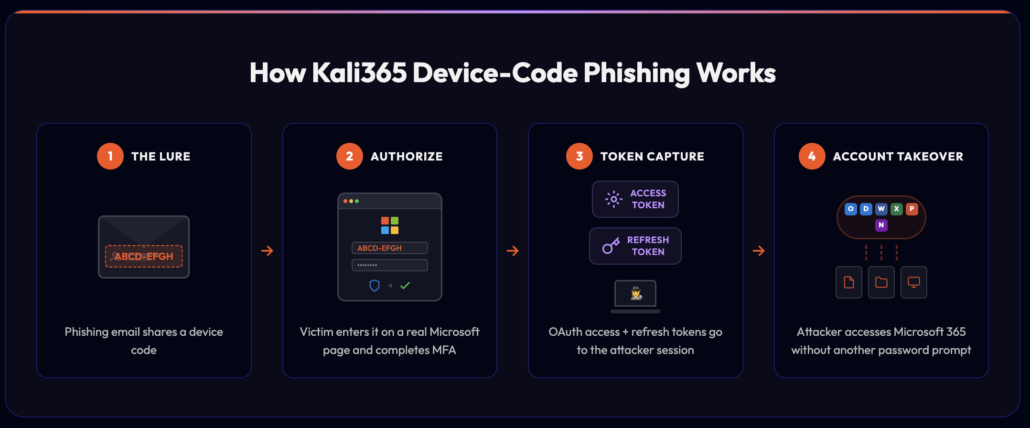
The Microsoft-specific Kali365 device-code phishing flow
The Microsoft-specific Kali365 device-code phishing flow:
- The lure: The victim receives a message impersonating a trusted productivity, document-sharing, or collaboration service, with a device code and instructions.
- The authorization: The victim enters the supplied code on Microsoft’s legitimate device-login page and completes the normal sign-in and MFA process.
- The token capture: Because the code belongs to an attacker-controlled session, Microsoft issues OAuth access and refresh tokens to that session after approval.
- The account takeover: The attacker uses the permitted tokens to access available services, potentially without another password or MFA prompt.
The Microsoft page and authentication process are genuine. The deception lies in who initiated the request and which session the victim is authorizing. Other Kali365 targets may require different, platform-specific workflows; Microsoft’s device-code sequence should not be assumed to describe every campaign.
Why the Threat Matters
MFA remains essential, but Kali365 targets the moment when a user is persuaded to approve what appears to be a legitimate request. If that deception succeeds, the attacker can begin operating through the victim’s trusted identity, observing how the organization communicates and potentially inserting themselves into sensitive business processes. What begins as a single authorization may develop into account takeover and financial fraud.
A June 2026 OSINT advisory, IBM X-Force described Kali365 activity focused on financial and operational teams and Electronic Funds Transfer themes, illustrating the potential path from identity compromise to fraud.
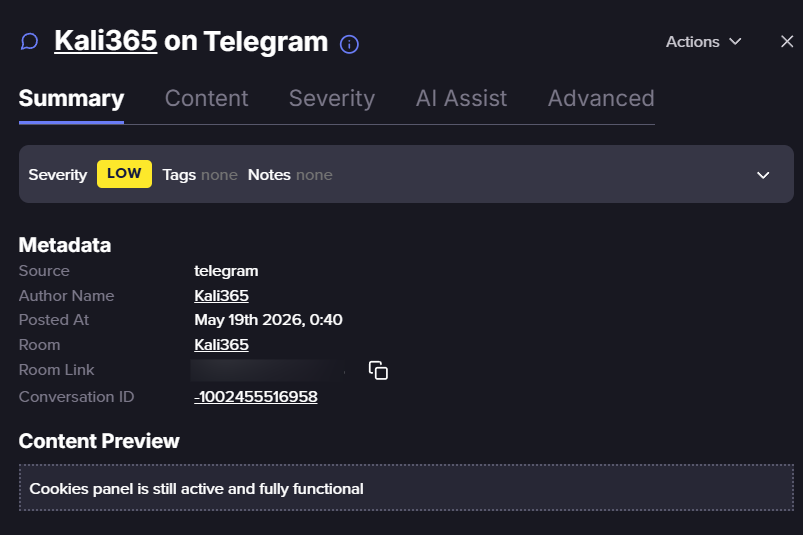
Telegram post of Kali365, claiming that its cookie panel remained operational. (Flare link to post, sign up for the free trial to access if you aren’t already a customer)
How Security Teams Can Respond
- Restrict or disable device authorization flows where they are not required. Most organizations do not rely on OAuth 2.0 device authorization for everyday workflows. Microsoft Entra ID provides an Authentication flows condition within Conditional Access that explicitly targets device code flow, allowing it to be blocked tenant-wide through a Block access grant control. Microsoft recommends approaching a unilateral block, permitting the flow only in documented and secured cases such as legacy tooling. Policies should be deployed in Report-only mode first to audit existing usage, as developer tooling and command-line utilities often depend on the flow. Where such dependencies exist, exceptions should be scoped to the relevant group rather than left open across the tenant. A policy requiring a compliant or managed device provides an alternative control, as authentication will fail for attackers operating from unmanaged devices.
- Establish a baseline before alerting on device-code activity. Reviewing successful device-code sign-ins across a 90-day window identifies which users and applications legitimately depend on the flow. Unexpected users or applications appearing in that baseline may indicate existing compromise. A user with no device-code authentication in the preceding thirty days who suddenly completes one is a strong indicator warranting investigation.
- Correlate both legs of the device-code exchange. The flow generates two related events: the victim’s interactive sign-in and the token redemption performed by the requesting session. Joining these events on their shared correlation identifier and comparing source IP address and user agent reveals mismatches between where the code was entered and where the resulting tokens were redeemed. Geographic or network-level separation between the two legs is difficult for an attacker to avoid and provides a high-confidence detection signal.
- Prioritize monitoring of commonly abused client identifiers. Observed campaigns frequently target the Microsoft Authentication Broker and Microsoft Office client applications, which carry broad pre-consented permissions and do not prompt the user for additional consent. Excluding sign-ins from trusted named locations reduces false positives substantially in these queries.
- Monitor device registration activity following device-code grants. Attacker-registered devices frequently retain default hostname patterns rather than organizational naming conventions. A device registered and used within a short interval warrants elevated scrutiny, as legitimate device registrations typically occur through managed IT onboarding processes.
- Extend detection to network and email telemetry. Because the victim’s browser must reach the identity provider’s device-login endpoint, proxy and DNS records showing traffic to that endpoint from users with no operational need for it provide an additional detection layer. Email telemetry offers complementary coverage: at least one documented campaign delivered lures through developer-platform subdomains that are uncommon in legitimate enterprise correspondence, particularly when correlated with device-code events for the same user.
- Recognize the limits of session revocation. Revoking refresh tokens does not invalidate access tokens already issued, which remain valid until they expire. Containment requires disabling the malicious client application, revoking refresh tokens, rotating affected credentials, and monitoring for subsequent lateral movement. Investigators should also identify persistence established during the access window, including newly registered authentication methods, device registrations, mailbox rules, and application consent grants, as these mechanisms survive session revocation.
- Train employees around the direction of authentication codes. Conventional awareness training is less effective against this technique because the victim authenticates on a legitimate identity-provider page and may complete MFA successfully, leaving no fraudulent domain or credential form to identify. A single directional rule addresses the pattern: legitimate services do not send codes for users to enter into a login page, as codes originate from the page rather than from an inbound message. This principle applies equally to device-code phishing, one-time-code relay, and the prize-claim workflow observed against MAX Messenger.
- Monitor underground communities for exposure of your organization. PhaaS operations are promoted, supported, copied, and discussed across cybercrime communities before and during active campaigns. The Telegram activity referenced above, in which the operator asserted continued availability of its cookie panel, illustrates the type of claim that distinguishes an actively maintained capability from a dormant kit. Early visibility into operator claims, exposed infrastructure, and brand impersonation provides lead time before campaigns reach employees and indicates which brands to prioritize for detection.
Credential & Identity Monitoring
Detect PhaaS Campaigns Targeting Your Organization Before They Reach Employees
Phishing-as-a-Service platforms like Kali365 are promoted, sold, and discussed across Telegram and dark web forums before campaigns launch. Flare continuously monitors these underground communities to detect when your brand is being impersonated, when stolen session tokens tied to your organization appear for sale, and when PhaaS operators shift their targeting, giving your team lead time to act.